
Menu
Close

Quick Answer: Medical site architecture is the planning system that decides where services, specialties, locations, educational resources, and inquiry paths belong on a practice website. A strong architecture starts with the practice’s real offerings, gives each important page one clear purpose, links related pages in context, and consolidates pages that do not add distinct value. The goal is not to publish the largest possible site; it is to make the practice easier for users and search engines to understand without creating thin, repetitive, or confusing pages.
For healthcare decision-makers, this planning work should happen before a redesign, content buildout, or technical SEO project. If the structure is unclear, writers create overlapping pages, developers build awkward menus, and search engines may discover pages without understanding how they relate. If the structure is sound, a practice can make better decisions about what to write, what to combine, what to link, and what to keep out of search.
Medical site architecture is the planned hierarchy, navigation, internal linking, URL organization, and indexing logic behind a healthcare website. It answers a practical question: how should a practice arrange its services, specialties, locations, providers, educational articles, and contact paths so that the site feels coherent?
This is different from a generic SEO audit. An audit finds problems in an existing site. Architecture decides what the site should contain and how the parts should relate before large amounts of content are produced. That distinction matters because a technically clean site can still be strategically disorganized.
For a medical practice, the architecture usually connects several page groups:
Google’s documentation supports planning for people first. In its guidance on helpful, reliable, people-first content, Google Search Central recommends focusing on people-first content rather than content made primarily to gain search rankings. For a healthcare website, that means the architecture should reflect real patient decision paths and real practice structure, not just keyword variations.
The first step is not a keyword list. The first step is documenting how the practice actually works. A website can only be clear if the underlying business structure is clear. This is especially important for multi-provider, multi-specialty, dental, med spa, plastic surgery, and anti-aging practices because the same offering may be described through services, specialties, provider roles, and locations.
Before deciding the service page structure, inventory the following:
This prevents the website from turning into an invented taxonomy. A medical website hierarchy should not create a page just because a search phrase exists. If the practice does not offer the service, does not operate in the location, or cannot support a topic with useful information, the page does not belong in the core architecture.
For healthcare content, stakeholder input also matters. Marketing, operations, providers, and compliance-aware leadership may all see different risks. One team may want every possible service page; another may notice that several pages would say almost the same thing. Architecture gives those teams a shared map before writing begins.
A service page structure works best when every page has one primary job. That job should be clear enough that a practice administrator can explain why the page exists in one sentence. If no one can state the purpose, the page may be a duplicate, a support article, a subtopic, or unnecessary.
Use this page-purpose test before approving a new service page:
The answer should be specific. “It is for SEO” is not a page purpose. “It explains one service category, helps users compare it with related services, and routes interested users to the relevant inquiry path” is closer to a usable purpose.
| Page type | Primary purpose | Typical relationship |
|---|---|---|
| Service page | Explain one service category from the practice’s marketing-approved perspective | Linked from a services hub or specialty page |
| Specialty page | Organize a genuine specialty, department, or area of practice | Links to relevant services, providers, and resources |
| Location page | Describe a real location and its relationship to the practice | Linked from location navigation or relevant practice pages |
| Provider page | Identify a real provider and their role in the practice | Linked from relevant specialty, location, or team pages |
| Educational article | Answer a distinct informational question | Links to the most relevant service or specialty page when useful |
| Contact page | Provide the main inquiry path | Linked from navigation and contextual calls to action |
A clear service page structure also reduces pressure on writers. Instead of trying to make every page cover everything, the content brief can define the page’s scope, audience, relationship to other pages, and intended next step.
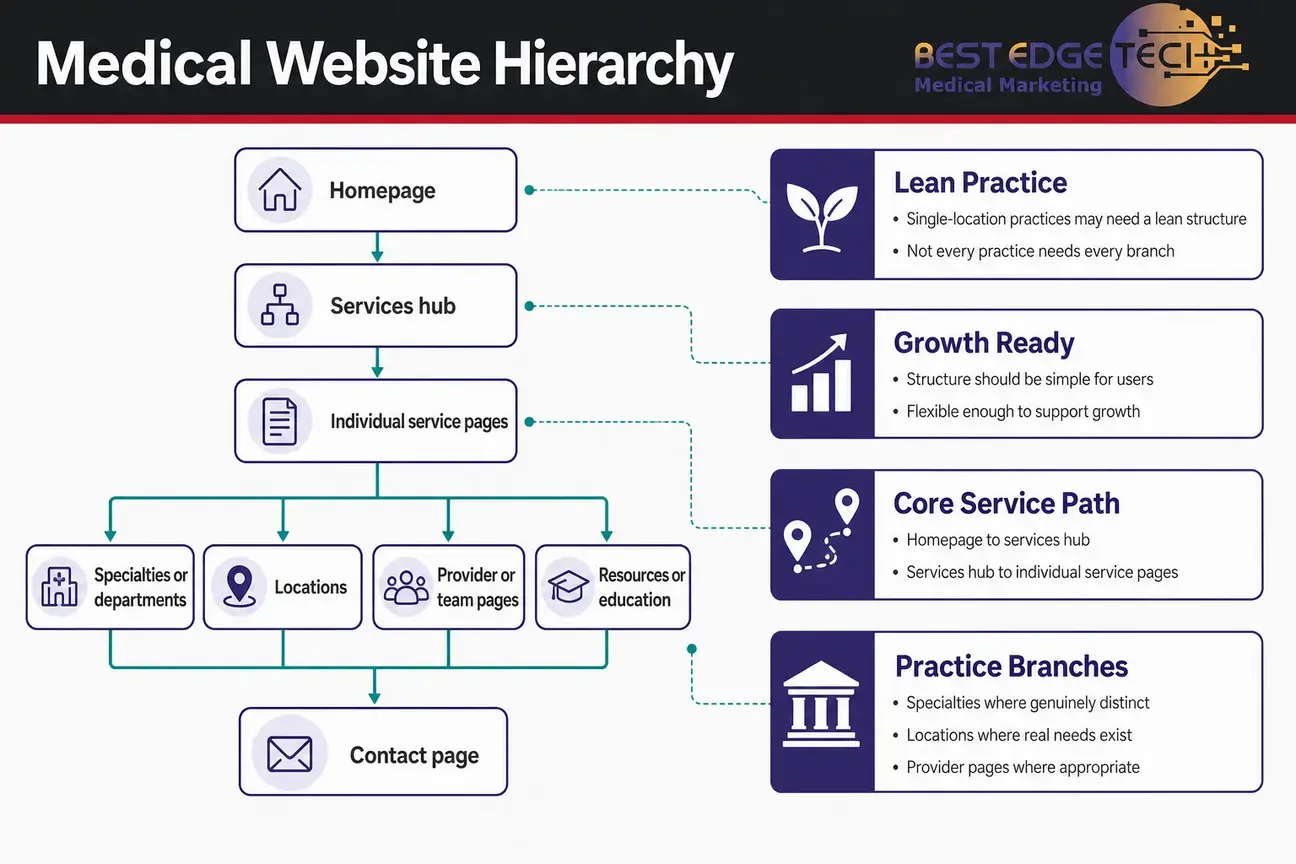
A medical website hierarchy should be simple enough for users to understand and flexible enough to support growth. Not every practice needs every branch. A single-location practice may need a lean structure. A multi-specialty organization may need services, specialties, locations, providers, and resources organized in separate groups.
A practical model often looks like this:
For example, a hypothetical practice might use paths such as:
Those paths are examples, not Google requirements. The important point is that the medical website hierarchy explains relationships. A services hub groups services. A specialty page organizes a clinical or operational area. A resource article answers a question and can link back to the relevant service when that next step is genuinely useful.
Google’s SEO Starter Guide says that Google primarily finds pages through links from other pages it has already crawled. That makes hierarchy more than a design preference. If important service pages are buried, orphaned, or reachable only through a sitemap, the site is harder for users and search engines to navigate.
The same principle applies to educational content. Articles should not float separately from the practice’s business goals. A post about how users compare providers can support a specialty page. A post about what to ask before contacting a practice can support a service page. The connection should be useful, not forced.
Many healthcare websites become confusing because services and specialties are treated as interchangeable. They are related, but they are not always the same thing. A service page describes what the practice offers. A specialty page organizes a broader clinical or organizational area. Separate pages make sense only when each has a distinct purpose.
Use these questions before separating a service from a specialty:
For example, a specialty page might summarize an area of practice, introduce relevant providers, and link to multiple related services. A service page might explain one offering, answer common decision-stage questions, and route users to the right inquiry path. If both pages would repeat the same copy with only the heading changed, consolidation is usually clearer.
This is also where practice leaders should avoid clinical overreach in marketing copy. The architecture can define where information belongs, but medical claims, advertising rules, and privacy considerations should be checked by the practice’s own counsel or compliance team.
Practice website navigation should use plain labels that match how users and internal teams talk about the practice. Clear labels help users decide where to click. They also keep the website from feeling like an internal filing cabinet.
For most practices, labels such as “Services,” “Locations,” “Providers,” “Resources,” and “Contact” are easier to understand than vague labels such as “Solutions” or “Explore.” There are exceptions, but the test is simple: would a busy prospective patient or referring stakeholder know what the label means without guessing?
Good practice website navigation usually follows these rules:
Google Search Central’s SEO Starter Guide also encourages content that is easy to read and well organized. A practical navigation system supports that goal by making sections and relationships obvious instead of forcing users to search inside the site.
Practice website navigation should also consider mobile users. If a menu is technically present but hard to open, difficult to scan, or filled with long labels, users may not understand the site structure. Architecture is not only a sitemap document; it has to work in the actual interface.
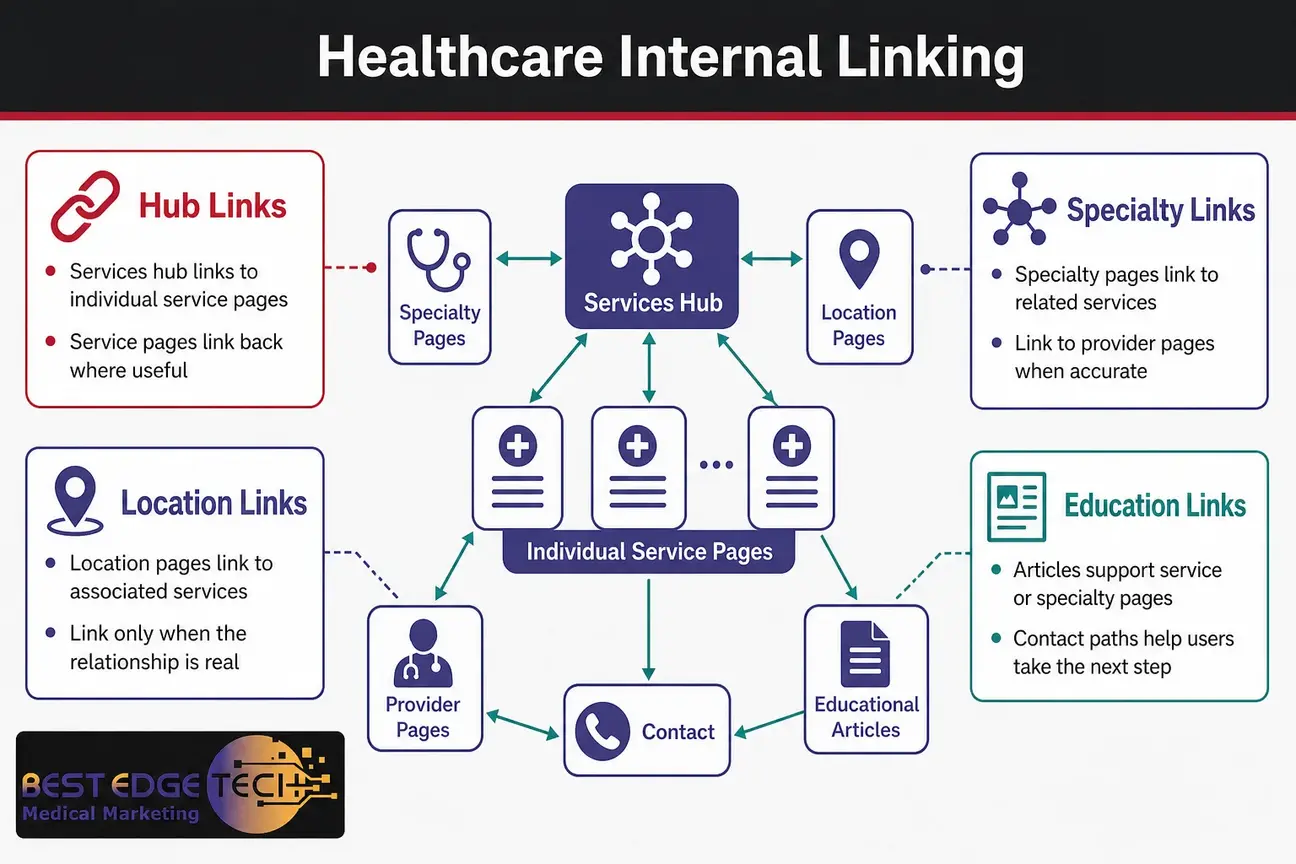
Healthcare internal linking is the system that turns a hierarchy into a usable experience. Parent pages should link to child pages. Child pages should link back to the appropriate hub where useful. Related pages should link to each other when the relationship helps users make sense of the topic.
A practical healthcare internal linking model includes:
Google’s guidance for generative AI features also reinforces the value of crawlability. Its guide says that, to maximize visibility in Google generative AI search features, site owners should ensure content is crawlable because Google Search generative AI models use publicly accessible, crawlable content to provide grounded responses. See Google’s guide to optimizing for generative AI features. That does not mean any practice can secure AI citations, but it does support crawlable navigation and useful links.
Use this worksheet when mapping healthcare internal linking:
| Source page | Destination page | Reason for link | Suggested anchor concept |
|---|---|---|---|
| Services hub | Individual service page | Defines the service in detail | Service name |
| Service page | Related specialty page | Explains the organizational relationship | Specialty name |
| Educational article | Service page | Connects education with a relevant offering | Relevant service phrase |
| Location page | Associated service page | Shows what is associated with that location | Service name |
| Specialty page | Provider page | Helps users understand who represents the specialty | Provider name or role |
Healthcare internal linking should be selective. A service page does not need to link to every other service. A resource article does not need a long list of unrelated pages. The best links answer the user’s next logical question.
Location pages are often overbuilt. A separate location page should represent a genuine, useful relationship, not just a city-keyword variation. For a practice with real offices, the location page can clarify where services are associated, which providers are connected, and how users should contact or navigate to that location.
A location page may be justified when it can answer questions such as:
Pages that only replace one city name with another should be evaluated carefully. If the copy, services, and user purpose are interchangeable, the pages may create clutter rather than clarity. Consolidation, stronger hub pages, or a different local SEO strategy may be more appropriate.
For national marketing topics, Best Edge Medical Marketing typically recommends resisting city stuffing. The Raleigh-headquartered agency serves healthcare practices across the United States, but the architecture principles in this article are not limited to one city or state.
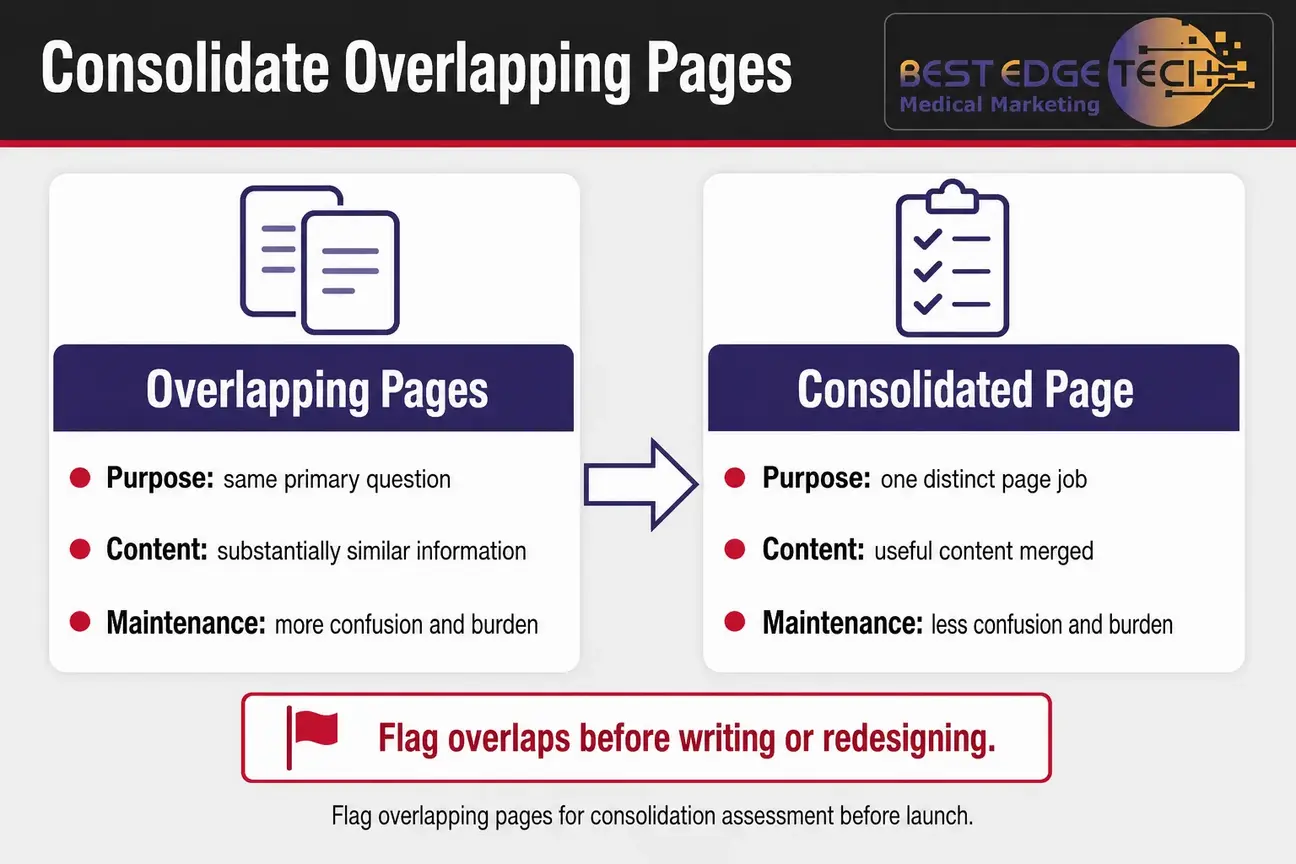
Consolidation is a planning decision, not a magic ranking lever. The goal is to reduce confusion, duplication, and maintenance burden. A page should be considered for consolidation when it has no distinct job in the service page structure or when it overlaps heavily with another page.
Evaluate pages for consolidation when they:
When consolidation is appropriate, the implementation plan may include merging useful content into the strongest relevant page, retiring weaker URLs, updating internal links, assessing redirects, checking canonical and indexing signals, removing obsolete navigation references, and reassessing the sitemap.
Do not assume that fewer pages are always better. Some practices need separate pages because users have distinct needs. The decision should be based on purpose, usefulness, and relationship to the broader medical website hierarchy.
A thin page is not simply a short page. A concise page can be useful if it fully serves a narrow purpose. A long page can still be weak if it repeats generic language, avoids the user’s actual question, or exists only to support a keyword variation.
Warning signs include:
Google’s SEO Starter Guide notes that content should be unique and well organized. In architecture terms, that supports clear page purposes, differentiated service pages, and consolidation when pages do not add distinct value.
For healthcare practices, usefulness also includes accuracy and quality controls. A page should not make unsupported clinical, outcome, cost, or regulatory claims. The architecture can identify where a topic belongs, but it cannot substitute for internal clinical and compliance checks.
Indexing decisions should follow page purpose. A page included in a sitemap is not automatically important, and a page hidden from navigation is not automatically strategic. Each page should have a clear role before the technical team decides how it should be handled.
For each URL, decide whether it should be:
A sitemap can support discovery, but it does not replace hierarchy. If a page is important, it should usually have an appropriate place in practice website navigation or contextual links. If a page is not important enough to link, the team should ask why it exists.
Structured data may also be part of implementation, but it should describe the page accurately rather than make the architecture appear stronger than it is. Google’s introduction to structured data explains that structured data helps Google understand information on a page; it does not replace useful content, crawlable links, or a coherent site structure.
Before producing content or approving design templates, validate the architecture with a repeatable planning sequence. This keeps the team from writing pages that later need to be merged, renamed, or removed.
This process also helps align website design and SEO. Designers need to know which page groups require templates. Writers need to know what each page should and should not cover. Developers need to understand navigation, crawlability, redirects, and technical signals.
If your team wants help turning this kind of architecture map into an SEO and design plan, you can see Best Edge Medical Marketing’s medical SEO services and medical website design. You can also contact Best Edge Medical Marketing or call (252) 303-0074. Share your website URL, specialties, locations, goals, recent site changes, and the service you are considering.
Architecture is where medical SEO and website design meet. SEO helps assess crawlability, internal links, indexation signals, content relationships, and page purpose. Website design turns the approved plan into menus, page templates, calls to action, and user flows.
Neither discipline should promise rankings, patient volume, revenue, or AI citations. Results depend on competition, site history, execution quality, technical constraints, and how clearly the practice can support its content. The practical goal is to build a site that is easier to navigate, maintain, expand, and evaluate.
Accessibility should also be considered during website planning. Navigation, headings, labels, and links should be usable by people with different devices and assistive technologies. The W3C Web Content Accessibility Guidelines overview is a useful starting point for teams discussing accessible web experiences, though practices should confirm legal obligations with their own counsel.
Use this checklist before launching a new site section, redesign, or major content expansion.
The final test is simple: if someone unfamiliar with the website can understand what the practice offers, where each service belongs, and how to take the next step, the architecture is doing its job.
Medical site architecture is not a one-time spreadsheet exercise. It is the foundation that keeps service pages, specialty pages, location pages, resources, and inquiry paths from competing with each other. When the structure is clear, the content team can write with purpose, the design team can build usable navigation, and the SEO team can evaluate discoverability without guessing what each page is supposed to do.
For most practices, the best architecture is not the largest. It is the one that reflects real offerings, creates a clear medical website hierarchy, supports thoughtful service page structure, uses healthcare internal linking to connect related pages, and keeps practice website navigation easy to understand.
This article is marketing education, not legal, medical or compliance advice. Confirm advertising and privacy requirements with your own counsel or compliance team.
Medical site architecture is the planned hierarchy and linking system that organizes a practice website’s services, specialties, locations, providers, educational resources, and inquiry paths. It determines how users move through the site and how search engines can discover relationships among pages.
No. A service should have its own page when it represents a distinct user need and can provide materially different, useful information. Services that overlap heavily may be clearer when grouped, summarized on a hub, or consolidated into a stronger page.
Not automatically. A location page should represent a genuine and useful location relationship. Pages that only replace one city name with another and offer no distinct value should be assessed for consolidation rather than created in bulk.
There is no universal click-depth rule that fits every medical practice website. The better planning rule is that important service pages should be reachable through clear, crawlable internal links and should not be orphaned.
A service page explains a specific offering or service category. A specialty page organizes a broader specialty, department, or area of practice. They should remain separate only when their purposes, audiences, and useful content are meaningfully different.
Consider consolidation when pages answer the same primary question, repeat substantially the same information, differ only by minor wording or location names, or cannot support a useful internal-linking relationship. Consolidation should be planned with redirects, internal-link updates, and indexing checks where appropriate.
Best Edge Medical Marketing is a medical marketing agency that provides marketing, SEO, design, and development services to businesses in the medical industry.
Call Us Today
(252) 303-0074