
Menu
Close

Quick Answer: The AI performance report in Google Search Console helps eligible medical practices see when links to their site were shown in Google Search generative AI features. As of 2026, Google documents this report for AI Overviews and AI Mode, but it measures visibility, not patient acquisition. Review the report by date, page, country, and device, then compare it with standard Search Console clicks and your own inquiry records before drawing marketing conclusions.
For practice owners, administrators, and healthcare marketing directors, the report is useful because it adds a new visibility signal to the monthly search review. It can show that a link to your site appeared in a covered Google AI feature. It cannot, by itself, show that someone clicked, called, submitted a form, scheduled, or became a patient. The practical measurement chain is: AI-feature impression, possible click, website session, inquiry, appointment or another internal outcome. Each stage needs its own evidence.
Healthcare searches are often complex. A prospective patient may compare specialties, insurance language, locations, provider bios, educational pages, and reviews before contacting a practice. Google’s generative AI features can now sit near the beginning of that journey, but they do not replace disciplined measurement.
The report gives medical practices a way to observe a narrow but important question: were links to the site shown in covered Google Search AI features during a selected period? That is a visibility question, not a revenue, appointment, or lead-quality question.
This distinction matters because healthcare leaders often need to justify marketing work to partners, boards, or ownership groups. If the team treats AI-feature visibility as a confirmed inquiry source, the practice can over-credit a channel before the evidence supports it. If the team ignores the report entirely, it may miss early signals about pages that are being surfaced in Google’s AI search experience.
The right approach is calm and evidence-based. Use the report as one layer in a broader search dashboard that includes standard Search Console performance, website analytics, call tracking, form tracking, and intake records where available. For broader strategy, the report can support planning for AI search optimization for healthcare, but no report can guarantee AI citations, rankings, patient volume, revenue, or a time to results.
Google identifies the report as the Generative AI performance report in Search Console. According to Google Search Console Help’s Generative AI performance report, the report shows how a site performs in generative AI features on Google Search, and Google defines impressions as the number of times links to a site were shown to a user in a generative AI feature.
That definition should guide every interpretation. The report does not say that a user clicked your link. It does not say that a user read your page. It does not say that a user contacted the practice. It does not say that the user was in your service area, needed your services, or was qualified to become a patient.
The report is still valuable. It can help your team see whether certain pages receive more reported visibility than others, whether visibility changes after documented site work, and whether reported visibility appears mostly on mobile, desktop, or particular countries. Used carefully, it can sharpen questions for the next month’s marketing work.
Google’s documentation also says Search Console does not include data from experiments in Search Labs because those experiments are still in active development. That limitation is important. The report should not be described as a complete record of every possible Google AI search experience.
Search Console AI data should not be treated like a conventional ranking report. The available Google documentation describes impressions, a chart, table dimensions, date ranges, filters, and exports. It does not establish a standard ranking position for AI-feature appearances.
For a medical practice, that means the report is better used for pattern recognition than for claims such as “we rank first in AI results.” A page may receive visibility in a covered feature during one period and not another. Another page may appear for informational searches but not generate measurable inquiries. Those are marketing questions to investigate, not promises to make.
The same caution applies to patient acquisition. A rise in visibility can coexist with flat clicks. A rise in clicks can coexist with flat inquiries. A rise in inquiries may come from standard organic search, direct visits, referrals, paid campaigns, reputation activity, or offline factors rather than a generative AI feature. The report gives a signal, not a complete attribution model.
If your practice is also reviewing medical SEO services, connect the AI data to the basics: crawlable pages, clear service information, accurate location information, useful content, provider credibility, and a website experience that lets a visitor contact the practice without friction.
Start with the Search Console property for the practice website. If the practice uses multiple properties, such as domain and URL-prefix versions, pick the same property each month so the record is consistent.
Google says not all properties have access because the report is being rolled out over time. Google also indicates that a property may not show data if it has not received enough impressions in generative AI features. In practical terms, the absence of a visible report or empty data should not be turned into a claim that the practice has no AI search visibility.
For a monthly process, keep a simple folder with the exported file, the date range, and notes about site changes. The export is not just a convenience. It creates a record that helps your team avoid relying on memory when partners ask why visibility changed.
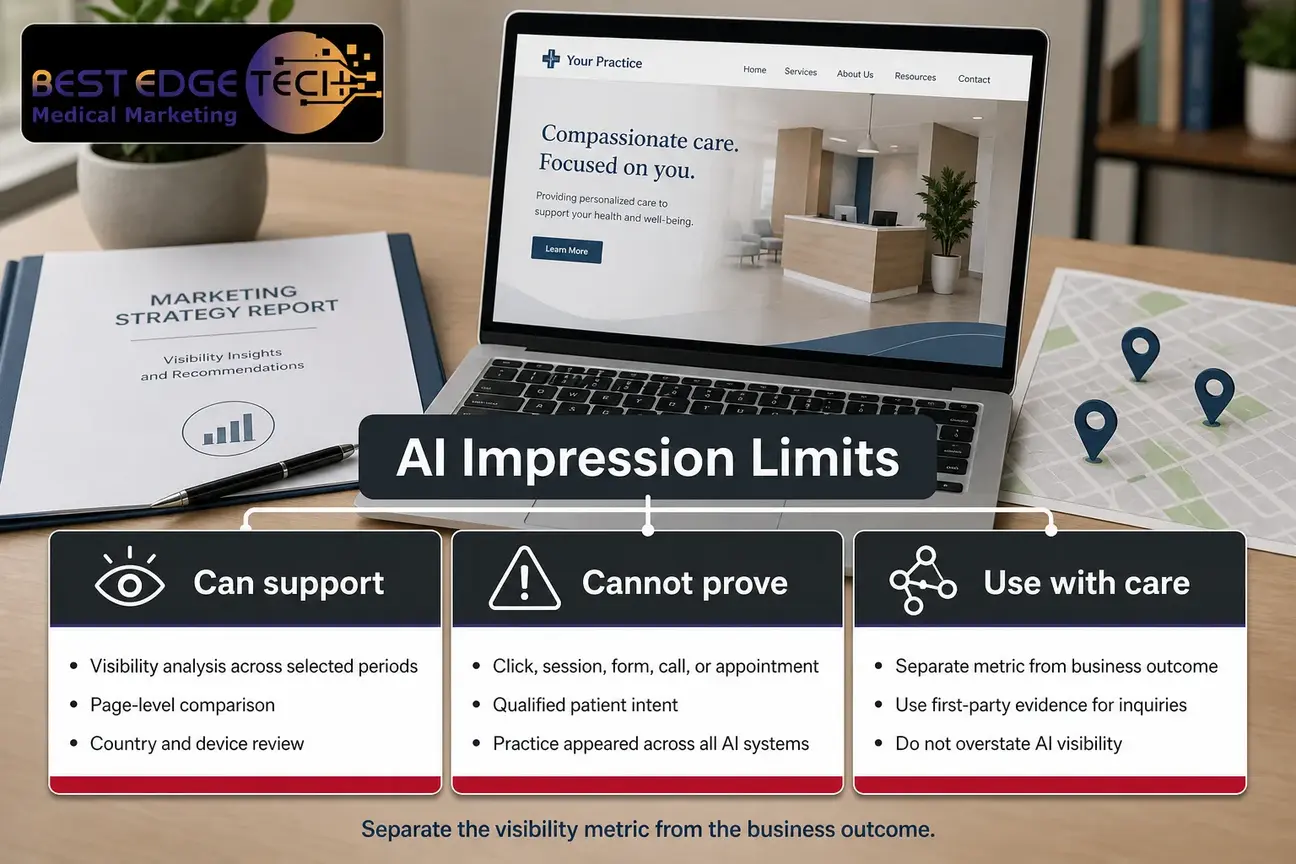
AI feature impressions are useful when your team defines them correctly. They indicate that links to your site were shown in a covered Google generative AI feature. They can support visibility analysis across selected periods, page-level comparison, country review, and device review.
AI feature impressions cannot support stronger claims by themselves. They do not prove a click. They do not prove a website session. They do not prove a form submission, a call, a consultation request, or a booked appointment. They also do not prove that your practice appeared across non-Google AI systems.
A useful way to explain this to leadership is to separate the metric from the business outcome. AI feature impressions belong near the top of the funnel. Patient inquiries, when recorded by the practice, sit much farther down the funnel. Between those points are several steps that may or may not happen.
For example, a specialty page could show AI feature impressions and receive no recorded inquiries that month. That does not mean the page failed. It means the team should examine the next links in the chain: standard clicks, landing-page engagement, call visibility, form usability, appointment-request paths, and whether the page serves an informational searcher or a ready-to-contact searcher.
The reverse can also happen. A practice may receive inquiries during a month when AI feature impressions are low or unavailable. Those inquiries may come from standard organic search, map results, direct traffic, referrals, reputation work, email, offline referral patterns, or other campaigns. Do not force attribution where the evidence is not available.
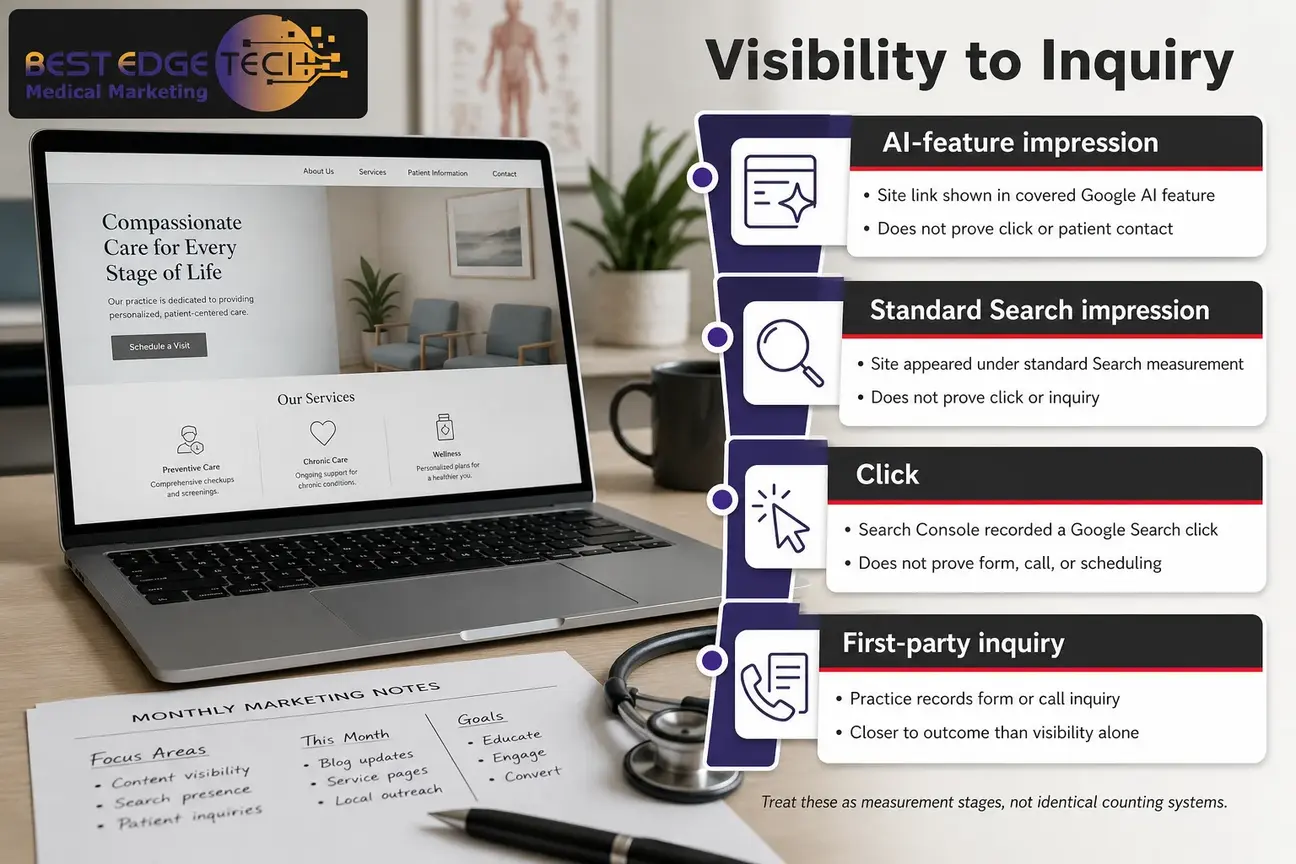
Use this comparison when explaining the report to owners, physicians, administrators, or a multi-location marketing team. The categories below are measurement stages, not identical counting systems.
| Measure | What it indicates | What it does not prove |
|---|---|---|
| AI-feature impression | A link to the site was shown in a covered Google generative AI feature | That the user clicked, contacted the practice, or became a patient |
| Standard Search impression | The site appeared under the applicable standard Search Console impression measurement | That the searcher clicked or became an inquiry |
| Click | Search Console recorded a click from Google Search | That the visitor completed a form, called, or scheduled |
| First-party inquiry | The practice recorded a form, call, booking request, or other defined inquiry event | That the inquiry came from an AI feature unless attribution is reliable |
This table is intentionally conservative. It protects the practice from overclaiming. It also helps marketing teams make better decisions. If visibility rises but clicks do not, the question is different from a month when clicks rise but inquiries do not. If inquiries rise, the team still needs attribution evidence before crediting the AI report.
As of 2026, Google’s Search Console documentation identifies AI Overviews and AI Mode as covered generative AI features in the report. AI Mode data should be read as part of Google Search visibility, not as a separate patient-intent label.
That distinction matters because AI Mode data may look new and important on a dashboard. New does not automatically mean closer to a patient inquiry. The report’s documented metrics and dimensions still need to be interpreted through the same visibility-to-inquiry chain.
When reviewing AI Mode data, ask practical questions:
Google’s AI features and your website documentation explains Google Search AI features from the site-owner perspective. It is appropriate to use that documentation for Google-specific interpretation. It is not appropriate to use Search Console AI data to claim visibility in systems that Google Search Console does not measure.
Search Console AI reporting becomes more useful when your team reviews dimensions rather than stopping at a total. Totals are easy to present, but they can hide whether visibility is coming from pages that matter to the practice.
Start with the page dimension. Separate service pages, location pages, provider-information pages, blog posts, and educational resources. This helps the practice understand whether visibility is tied to pages that support patient decision-making or pages that are primarily informational.
If a service page receives AI feature impressions, examine whether the page accurately describes the service category, the practice’s locations, and the next step for contacting the office. If an educational page receives visibility, examine whether it links to the appropriate service page without turning the page into medical advice.
Avoid broad statements such as “this page is cited by AI everywhere.” Search Console AI reporting is about covered Google Search generative AI features, not the entire AI ecosystem.
The country dimension can help a practice separate potentially relevant visibility from visibility that may be outside the intended market. A practice serving patients in the United States should interpret international visibility differently from visibility in its target market.
Country data does not prove intent. A searcher’s country does not tell you whether the person needs care, can become a patient, or wants an appointment. Use it as context, not as a conversion forecast.
Device data can help the team evaluate whether mobile and desktop patterns deserve different follow-up. If mobile visibility is prominent, it is reasonable to review the mobile experience, phone tap targets, form usability, page speed, and whether contact options are clear.
Do not claim that one device segment converts better unless your first-party inquiry data supports that conclusion. Device data in the report is a visibility signal. Conversion analysis requires separate evidence.
This is where website work often intersects with measurement. If mobile visibility is present but inquiries are weak, the next review may involve medical website design, call buttons, form length, accessibility, page clarity, and tracking setup.
Date ranges are essential. Compare complete months where possible, and note any major site changes beside the data. Examples include a site migration, navigation change, new service page, provider bio update, technical fix, content rewrite, analytics change, or call-tracking change.
Short fluctuations can be real without being durable. A single week of movement should raise a question, not settle a strategy. For most practices, a monthly cadence is a more stable operational rhythm than reacting to every short-term change.
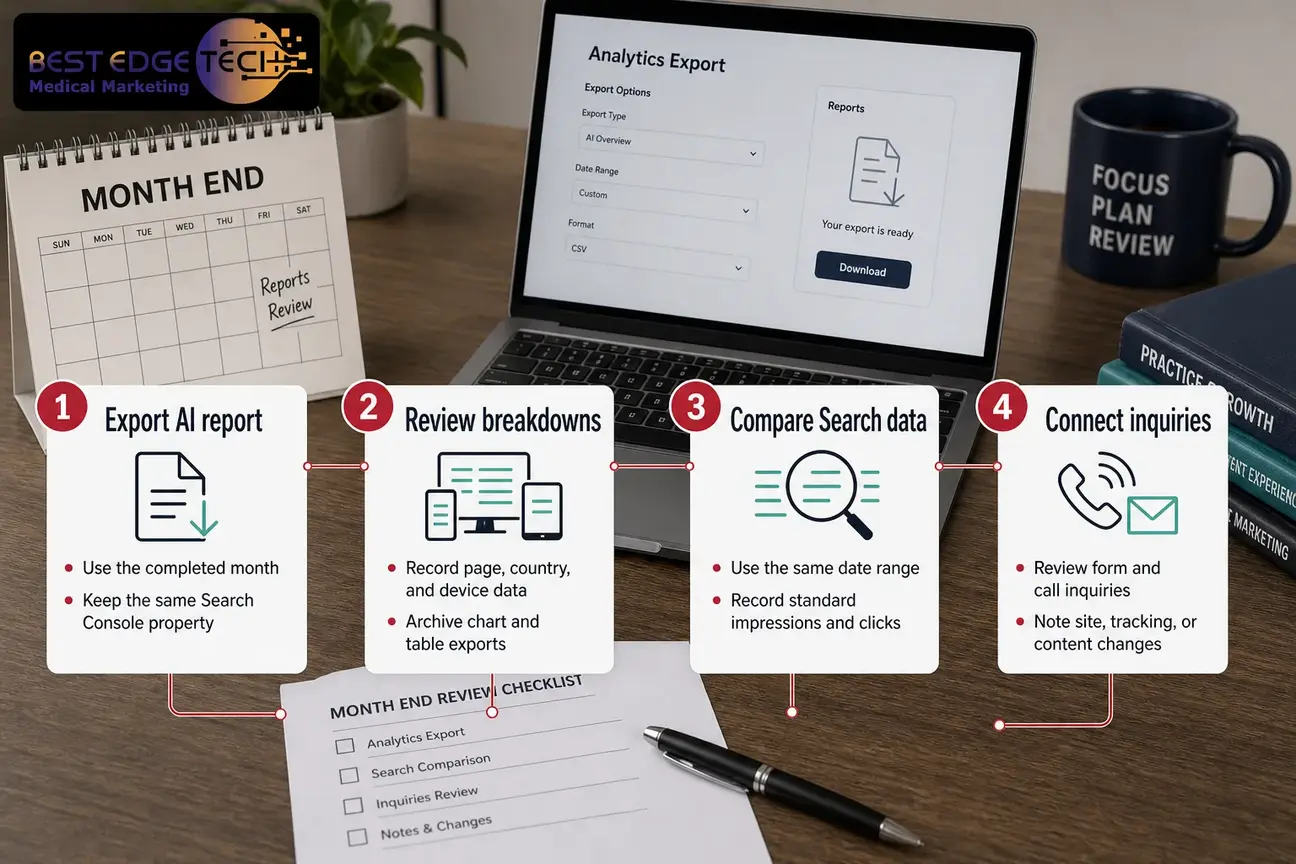
An AI visibility report is most useful when it is part of a repeatable monthly process. The goal is not to prove that every impression caused a business result. The goal is to create a disciplined record of visibility, clicks, inquiry signals, and known site changes.
Use this “Visibility-to-Inquiry Review” at the close of each month:
This workflow makes room for uncertainty. AI feature impressions can coexist with zero recorded inquiries. An inquiry can occur without being attributable to a generative AI feature. A page can gain visibility because it better satisfies informational search needs, while a separate service page drives the eventual inquiry.
For a Raleigh-headquartered agency serving healthcare organizations nationally, Best Edge Medical Marketing approaches AI visibility as part of broader healthcare search work, not as a stand-alone promise. If your practice wants help interpreting Search Console AI data in context, you can contact Best Edge Medical Marketing or call (252) 303-0074. Share your website URL, specialties and locations, recent site changes, goals, markets served, and the service you are considering.
The monthly record should separate what Google provides from what your practice records internally. Search Console does not provide every field below. The point is to build a practical marketing log that connects external visibility with first-party evidence where available.
| Field | Why it matters | Source or owner |
|---|---|---|
| Reporting month | Keeps comparisons consistent | Marketing team |
| Search Console property | Prevents mixed-property reporting | Search Console |
| AI feature impressions | Shows covered Google AI-feature visibility | Generative AI performance report |
| AI-feature pages | Identifies visible URLs | Generative AI performance report |
| AI-feature countries | Adds market context | Generative AI performance report |
| AI-feature devices | Adds mobile and desktop context | Generative AI performance report |
| Standard Search impressions | Provides broader Google Search context | Standard Search Console performance |
| Standard Search clicks | Shows recorded clicks from Google Search | Standard Search Console performance |
| First-party form inquiries | Tracks defined form submissions | Practice tracking system |
| First-party call inquiries | Tracks defined phone inquiries | Practice call tracking or intake system |
| Tracking or website changes | Explains possible data shifts | Marketing and website teams |
| Attribution confidence | Prevents overclaiming | Marketing review |
| Notes about incomplete data | Documents gaps honestly | Marketing review |
Keep the log simple enough that the practice can maintain it. A detailed dashboard that no one updates is less useful than a disciplined spreadsheet reviewed every month.
Measurement should lead back to page quality. Google’s guide to optimizing your website for generative AI features emphasizes that site owners should follow Google Search essentials and make content accessible to Google, rather than relying on special shortcuts for generative AI features.
For healthcare organizations, quality also means being careful with YMYL topics, a term Google uses for “Your Money or Your Life” subjects that can affect health, financial stability, safety, or welfare. A medical practice can show real expertise without turning marketing pages into unsupported clinical advice.
Practical signals include accurate provider bios, credentials the practice has confirmed, clear service categories, sourced claims where claims are needed, transparent authorship or organizational ownership, and pages that answer patient decision questions without promising outcomes. A dental practice, med spa, plastic surgery practice, or longevity clinic can explain how to choose a provider and what to expect from the office process without making unsupported treatment claims.
Google’s helpful, reliable, people-first content guidance is a useful reference point for content review. In healthcare marketing, that guidance should be paired with the practice’s own clinical, legal, and compliance review processes before publishing claims about services, conditions, treatments, testimonials, or privacy practices.
The most common reporting mistake is treating visibility as acquisition. A chart can look persuasive in a partner meeting, but it should not be labeled as patient growth unless the practice has reliable supporting evidence.
Avoid these conclusions:
Another mistake is mixing different date ranges. If the AI report uses one month, standard Search Console uses a different period, and the call report uses a billing-cycle date range, the comparison becomes noisy. Align the ranges before discussing patterns.
A third mistake is failing to note tracking changes. If the practice changed forms, phone routing, analytics settings, site templates, or call-tracking numbers, inquiry comparisons may shift for reasons unrelated to search visibility. Record those changes beside the report.
A fourth mistake is ignoring privacy and intake boundaries. When reviewing forms, calls, and appointment requests, keep the process HIPAA-aware. Do not place unnecessary protected health information in marketing spreadsheets. The HHS Office for Civil Rights HIPAA Privacy Rule materials are a relevant starting point for privacy awareness, but practices should confirm requirements with their own counsel or compliance team.
Use this checklist as a practical monthly closeout. It is intentionally focused on measurement discipline rather than promises.
The best reporting habit is restraint. A good monthly review should tell decision-makers what the data shows, what it does not show, and what the team will check next.
Best Edge Medical Marketing is a Raleigh-headquartered healthcare digital marketing agency serving medical practices and healthcare organizations across the United States. For this topic, the relevant service connection is AI search visibility, not a promise of AI citations or patient acquisition.
Search Console AI data can inform priorities for page improvement, internal linking, content structure, service-page clarity, provider-information pages, and the connection between visibility and inquiry paths. It can also help a practice decide whether related resources, such as Google AI Overviews for doctors or GEO for medical practices, are worth reviewing as part of the team’s education.
The scope of work depends on practice size, specialties, number of locations, competition, content volume, technical debt, and tracking maturity. A single-location practice with a clear website may need a different process than a multi-location specialty group with many service lines and legacy content.
If your team is ready to turn the AI visibility report into a cleaner monthly measurement process, request a consultation or call (252) 303-0074. Bring the website URL, specialties and locations, goals, target markets, recent site changes, Search Console access status, and the service you are considering.
The AI performance report is a useful new layer in healthcare search measurement, but it should be interpreted with discipline. Use it to understand reported visibility in covered Google Search generative AI features. Do not use it as a stand-alone lead report, ranking report, or patient-acquisition report.
The strongest monthly review combines AI feature impressions, page-level patterns, countries, devices, dates, standard Search Console clicks, and first-party inquiry tracking. Even then, attribution should be labeled carefully. Some findings will be known. Some will be probable. Some will remain unknown.
That restraint is not a weakness. It is how healthcare marketing teams protect credibility while still learning from new search data. The goal is not to make dramatic claims. The goal is to improve the practice’s website, content, measurement, and decision-making over time.
This article is marketing education, not legal, medical or compliance advice. Confirm advertising and privacy requirements with your own counsel or compliance team.
It is a Search Console report that shows how a site performs in Google Search generative AI features. Google documents the report for AI Overviews and AI Mode and provides impression data for links shown in those covered features.
Open the property in Google Search Console and look in the Search performance reporting area for the Generative AI performance report. Availability is being rolled out, so not every property will necessarily show the report.
No. An impression means a link to the site was shown in a covered Google generative AI feature. A click requires separate click data, and an inquiry requires first-party tracking such as forms, calls, or appointment-request records.
Yes, Google’s documentation identifies AI Overviews and AI Mode as included generative AI capabilities for the report. The report should still be interpreted as Google Search visibility data, not as proof of patient acquisition.
The report may not appear because Google is rolling it out over time. A property also may not show data if it has not received enough impressions in covered generative AI features. Missing data should not automatically be interpreted as zero visibility.
No. The report defines visibility through impressions and dimensions such as pages, countries, devices, and dates. To evaluate inquiries, a practice must review its own forms, calls, booking requests, intake records, and attribution evidence.
A monthly review is a practical cadence for most practices because it allows comparison with standard Search Console data and first-party inquiry records. Weekly movement can be noted, but it should not be treated as a durable trend without more context.
Best Edge Medical Marketing is a medical marketing agency that provides marketing, SEO, design, and development services to businesses in the medical industry.
Call Us Today
(252) 303-0074