
Menu
Close

A healthcare website redesign should protect the pages, search signals, accessibility, performance, and inquiry paths that already matter to the practice before new templates go live. Quick Answer: document the current site first, then decide whether you are doing a visual redesign, a URL-changing migration, or a separate SEO recovery project. If URLs change, map important old URLs to relevant new destinations, test indexability, verify analytics, and monitor Search Console after launch. This checklist is marketing education for practice owners and healthcare marketing teams, not medical, legal, HIPAA, or compliance advice.
For medical practices, dental offices, med spas, plastic surgery practices, and anti-aging or longevity clinics, a redesign is not just a creative project. It can affect how patients and referral sources find service pages, compare providers, use forms, click phone numbers, and understand what the practice offers. A new design can be a good operational move, but it can also create avoidable problems if the team changes URLs, deletes pages, blocks indexing, removes service details, or loses conversion tracking without a plan.
This guide gives administrators and marketing leads a practical website redesign SEO process they can use with developers, hosting teams, internal leadership, and compliance teams. It does not promise traffic, rankings, patient volume, or a launch timeline. Search visibility after a redesign depends on the site’s history, competition, content continuity, technical execution, and how much changes at once.
The main risk is not the redesign itself. The risk is changing too many search-critical elements without a record of what existed before. A new WordPress theme, menu structure, content model, page builder, hosting setup, or form tool can change how pages are crawled, indexed, loaded, measured, and used. The practice may see fewer patient inquiries and not know whether the issue is search visibility, form tracking, a broken call button, or a service page that no longer answers the query.
A strong planning process starts with preservation. Preserve the current URL inventory. Preserve the purpose of high-value service pages. Preserve accurate provider, location, and contact information. Preserve internal paths to appointment and inquiry actions. Preserve measurement definitions so the practice can compare before and after launch.
Google’s own SEO Starter Guide explains that redirects should be used when moving content and that site owners should help search engines understand their pages. For a redesign, that means the development team should not treat redirects, metadata, canonical tags, and internal links as cleanup tasks after launch. They belong in the project plan.
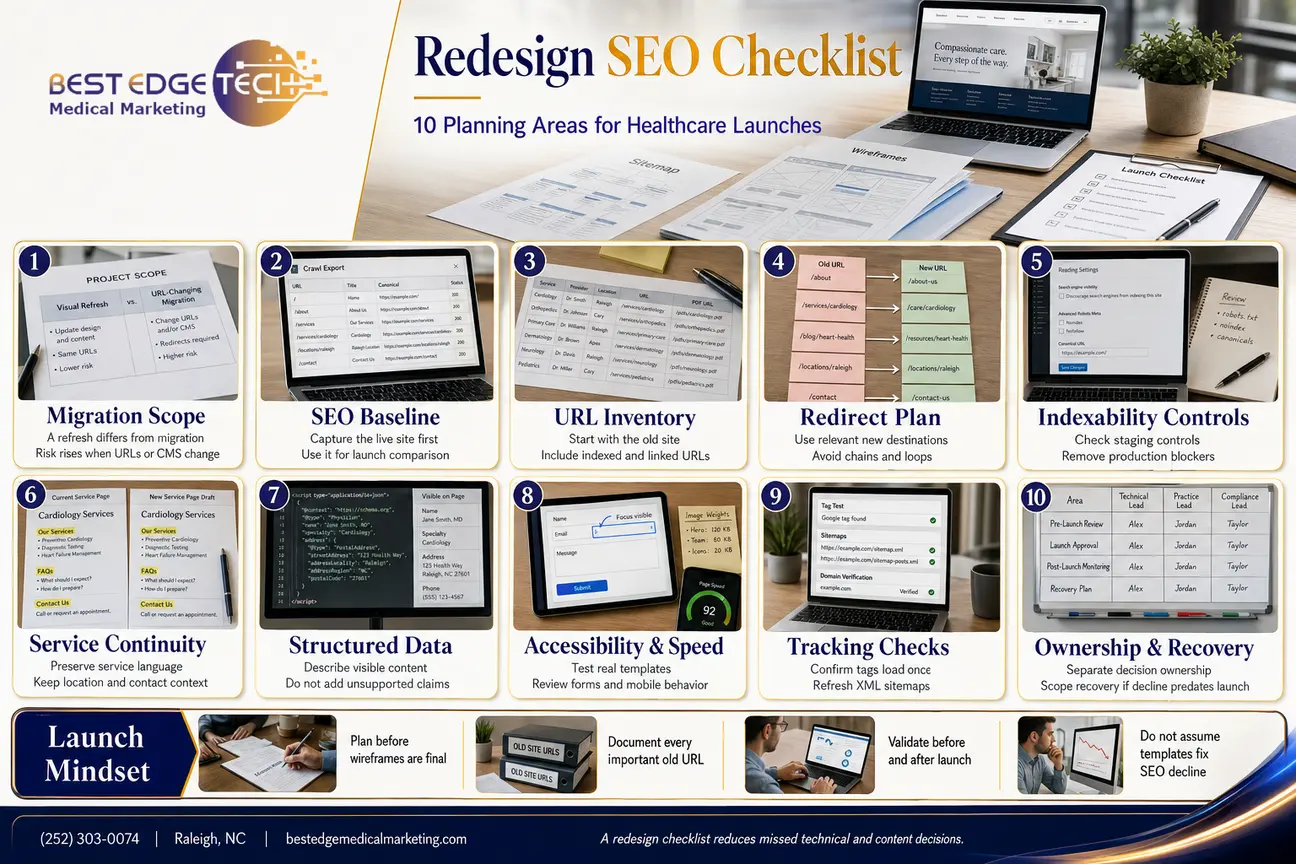
A medical website migration is not the same as a cosmetic refresh. A visual redesign may keep the same domain, same URLs, same content structure, and same hosting environment. The practice changes the look and page layouts, but the search architecture stays mostly intact. This still requires QA, yet the risk profile is different from a project that changes domains, URL paths, CMS settings, hosting, content hierarchy, or service-page structure.
A URL-changing medical website migration needs a deeper plan. Every important old URL should have a documented outcome: keep it, redirect it to a closely relevant new destination, consolidate it into a broader resource, or intentionally retire it. If the team is rebuilding in WordPress, confirm whether slugs, category paths, pagination, provider profiles, location pages, media files, and blog URLs will change.
A full SEO recovery is different again. Recovery work is a diagnostic effort for an existing visibility problem. It may involve historical technical issues, lost content, indexing exclusions, manual-action concerns, spam-policy issues, local-profile problems, weak relevance, or major content-quality gaps. A redesign can create new SEO problems, but it should not automatically be treated as a recovery project.
Before scope is approved, label the project honestly:
The more categories a project includes, the harder it becomes to diagnose post-launch movement. If the practice changes design, content, URLs, internal links, hosting, and forms at the same time, a drop in visibility or inquiries can have multiple causes. This is why the baseline step matters.
Website redesign SEO starts before wireframes are final. The practice should capture the current state of the website while it is still live. This baseline gives the team a reference point for URL decisions, page continuity, analytics validation, and launch monitoring.
Begin with a crawl of the current site. Export indexable pages, page titles, meta descriptions, canonical URLs, status codes, internal links, redirects, and blocked pages. Pull XML sitemap URLs separately because a sitemap may include pages the crawl misses or may reveal outdated URLs that need cleanup.
Next, collect search and conversion data. Search Console can show which pages receive clicks and impressions, while analytics can show landing pages, form events, phone clicks, and contact-button activity. Treat this as measurement continuity, not a promise of improvement. Correct tracking helps the practice evaluate the redesign; it does not itself improve rankings or inquiries.
Your baseline should include:
This baseline also gives administrators a business review list. Which services are active? Which locations are accurate? Which provider biographies require updates? Which inquiry paths matter most? Which pages have legal, privacy, or advertising language that should be reviewed before reuse? These are not purely technical decisions.
A medical website migration should never begin with a blank spreadsheet. It should begin with the old site. Build an inventory that includes every URL that is indexed, linked internally, included in sitemaps, used in advertising or printed materials, receiving organic sessions, or serving as a conversion path.
The inventory should be broader than service pages. Include provider profiles, location pages, specialty landing pages, educational resources, contact pages, form pages, thank-you pages, PDFs, image URLs that receive meaningful traffic, and old URLs already being redirected. Healthcare sites often accumulate older campaign pages or blog resources that still attract searches. The practice may choose to retire some pages, but that should be a deliberate decision.
Use these columns in the migration sheet:
| Field | Why it matters |
|---|---|
| Old URL | The exact page currently live or known from historic data. |
| Current status | Shows whether the page is indexable, redirected, blocked, missing, or returning an error. |
| New URL | The intended live destination after launch. |
| Destination relevance | Confirms the new page answers the same or closely related user intent. |
| Redirect status | Records whether the move is permanent, temporary, or intentionally retired. |
| Business owner | Identifies who approves service, location, provider, and operational accuracy. |
| Test date | Documents when the redirect and destination were tested. |
For high-value pages, do not rely on title similarity alone. Compare intent, service language, headings, internal links, calls to action, and practice information. A page about a specific specialty should not be redirected to a generic homepage just because both are on the same site. Irrelevant redirects can frustrate users and make troubleshooting harder.
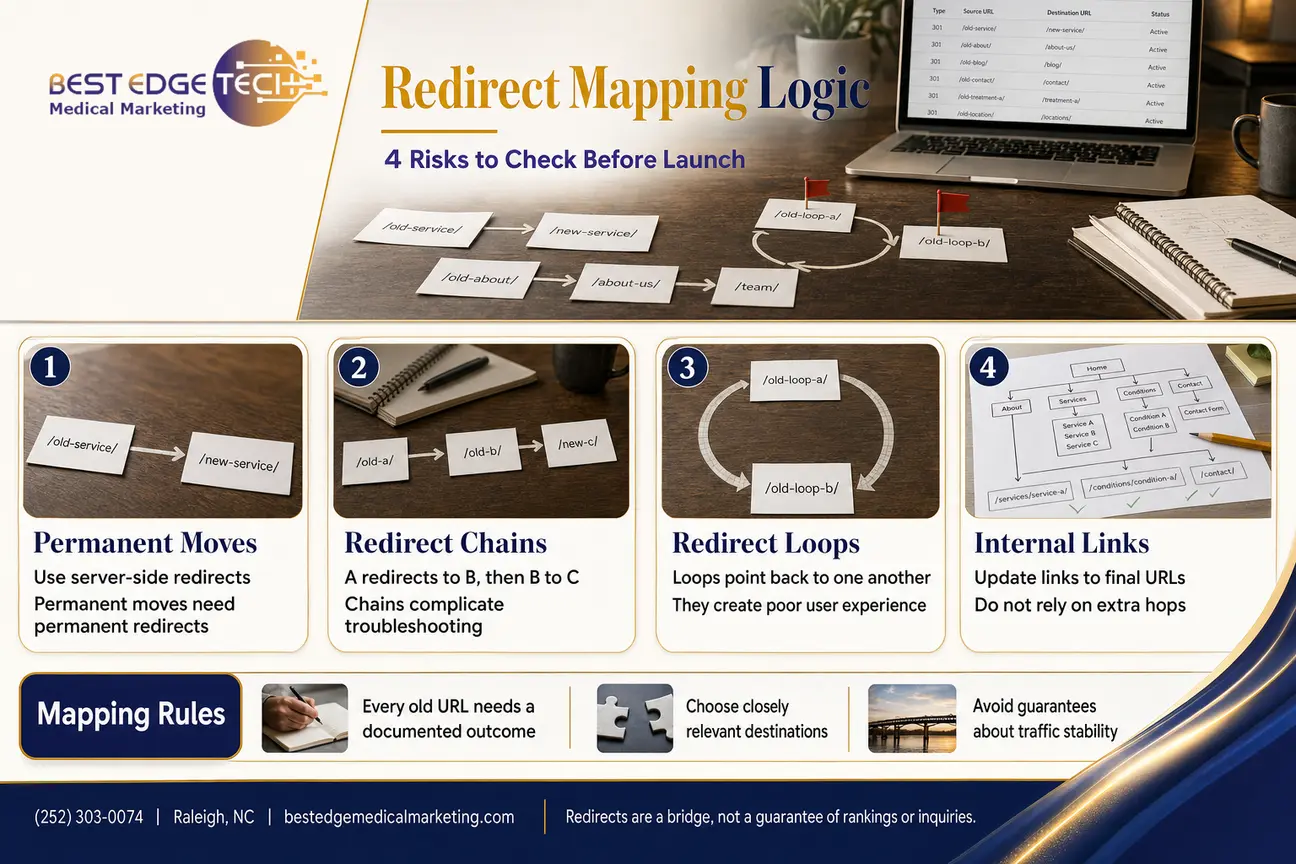
Redirects for websites are the technical bridge between old URLs and new URLs. As of 2026, Google Search Central’s documented recommendation is to use server-side redirects when a page’s URL changes; for a permanent move, use a permanent redirect. That recommendation helps users and crawlers reach the correct replacement page, but it is not a guarantee that rankings, clicks, traffic, or patient inquiries will remain stable.
The redirect plan should avoid chains and loops. A chain occurs when URL A redirects to URL B, and URL B redirects again to URL C. A loop occurs when redirects point back to one another. Both create poor user experience and make technical troubleshooting harder. Internal links should point directly to the final live URL, not to old URLs that rely on redirects.
Redirects for websites also need retirement rules. If a page has no relevant replacement, forcing it to an unrelated destination may not help users. In those cases, the technical SEO and practice team should decide whether the page should return an appropriate not-found or gone response, be rebuilt, or be consolidated into a truly relevant resource. The right answer depends on content value, user intent, and operational accuracy.
For WordPress projects, confirm where redirect rules will live: server configuration, hosting controls, a redirect plugin, an SEO plugin, or a combination. Avoid duplicate rules in multiple systems when possible. The team should also document who can edit redirects after launch, because accidental changes can affect service pages and conversion paths.
Use this pre-launch redirect checklist:
Many redesign problems come from staging controls that accidentally follow the site into production. A WordPress redesign often uses password protection, noindex settings, robots.txt blocks, staging-domain canonicals, or temporary plugin settings during development. Those controls can be useful before launch, but they must be checked carefully before the production site is opened to search engines.
Review the WordPress reading settings, SEO plugin indexability settings, page-level noindex controls, robots.txt file, XML sitemap configuration, and canonical tags. Confirm that production pages do not point their canonical tags to staging URLs. Confirm that absolute internal links do not still use the staging domain. Confirm that sitemap URLs are the preferred production URLs.
Indexability checks should be performed on representative templates, not just the homepage. Test main service pages, specialty pages, provider profiles, location pages, blog posts, resource pages, contact pages, and any form confirmation pages. A homepage can be indexable while service pages are accidentally blocked.
For healthcare practices, the owner or administrator should approve page accuracy, while the technical team should approve crawling and indexing controls. This separation prevents a common gap: the developer confirms the page loads, but no one confirms whether the page should be indexed, whether it describes the correct service, or whether the contact path works operationally.
Keep a rollback plan. It does not need to promise instant restoration, but it should identify backups, hosting access, DNS control, theme/plugin versions, redirect rules, and the people who can act if the launch creates serious issues. The larger the medical website migration, the more important this plan becomes.
A healthcare website checklist should give special attention to service pages because they often connect search intent to patient inquiries. A redesign may improve layout, but it should not remove the details that helped users and search engines understand the service. Compare the old and new versions before launch.
Review each important service page for primary service language, specialty terminology, headings, internal links, visible FAQs, provider or department references, location context, contact options, and page-specific metadata. If the practice publishes educational content, make sure clinical or treatment-related claims are handled through the practice’s own appropriate internal process. This article does not provide medical claim review.
Be cautious when combining several pages into one. Consolidation can be the right business decision, but it changes topical coverage, internal linking, and conversion paths. A dental practice, for example, may choose to merge overlapping pages with similar intent. A med spa or plastic surgery practice may need separate pages when users compare distinct services. The decision should be based on search intent, business accuracy, and compliance input, not simply a desire for fewer pages.
A useful healthcare website checklist for service-page continuity includes:
For additional design and conversion planning, Best Edge Medical Marketing offers medical website design for healthcare organizations considering a WordPress redesign. If the project also involves search architecture, content continuity, or migration planning, connect design decisions with medical SEO services early instead of treating SEO as a final launch check.
Structured data should describe visible, accurate page content. It should not be used to insert claims that the page does not support. Google’s structured data introduction explains that structured data helps Google understand page content and can make pages eligible for certain search features, but it does not guarantee rich results, rankings, or patient inquiries.
During website redesign SEO QA, validate structured data on representative templates. Review breadcrumbs, organization information, service pages, article pages, FAQ sections if used, and any location or provider-related markup the practice’s technical team has approved. The markup should match visible content and should not carry over stale addresses, old phone numbers, retired services, unsupported ratings, or offer information from a previous template.
For healthcare sites, structured data choices can intersect with operational and compliance questions. The development team can implement markup, but the practice must verify business accuracy. Counsel or the practice’s privacy/compliance team should review sensitive claims, advertising representations, testimonials, before-and-after content, and any use of reviews or endorsements.
If the redesigned site includes FAQ content, the visible FAQ and any FAQ-related markup should match. Do not mark up hidden content that users cannot access. Do not add review, rating, offer, or provider claims simply because a plugin offers fields for them.
Accessibility belongs in the redesign acceptance criteria, not as a late visual polish task. The W3C Web Content Accessibility Guidelines page is an authoritative starting point for understanding web accessibility standards. Legal applicability and conformance decisions should be reviewed with appropriate accessibility specialists and counsel.
For practice owners, the practical question is whether patients, caregivers, staff, and referring parties can use the redesigned site. Can a keyboard user move through the menu, forms, accordions, and dialogs? Is the focus indicator visible? Are form fields labeled? Do error messages explain what needs attention? Does the appointment or inquiry form remain usable on mobile? Are headings logical? Are links descriptive?
Accessibility also affects content and design decisions. Low-contrast text, image-only headings, vague buttons, inaccessible PDFs, autoplaying media, unlabeled icons, and complex form widgets can create barriers. Meaningful images should have useful alternative text. Decorative images should not create noise. Videos may need captions or transcripts depending on use and requirements.
Include accessibility in the healthcare website checklist before launch:
Performance testing should cover the templates the practice actually uses. A fast homepage does not mean a provider page, location page, blog article, embedded form, or media-heavy service page performs well. Google’s Core Web Vitals documentation explains performance signals and field data concepts that can help teams evaluate user experience, but passing performance checks does not guarantee rankings, conversions, accessibility, or compliance outcomes.
Test homepage, service, specialty, location, provider, blog, contact, and confirmation templates. Review mobile and desktop behavior. Look at image weight, video embeds, font loading, third-party scripts, consent tools, analytics tags, chat tools, form scripts, caching, compression, and hosting configuration. Medical sites often add scheduling widgets, maps, call tracking, analytics, and compliance-related tools; each can affect performance and measurement.
Conversion testing should be as specific as performance testing. Confirm phone links work on mobile. Confirm forms submit to the right destination. Confirm required fields make sense. Confirm success states appear. Confirm thank-you or confirmation pages are not accidentally indexable if the practice does not want them in search. Confirm events still use consistent names so reporting remains comparable.
A website redesign SEO plan should separate performance improvement from measurement continuity. Faster pages and cleaner templates can support user experience, but the practice still needs stable analytics to understand what changed. If events are renamed at launch, the team may lose the ability to compare form submissions or phone clicks before and after redesign.
The healthcare website checklist should include tracking verification before and after launch. Confirm that analytics tags load once, not zero times or multiple times. Confirm consent behavior is documented. Confirm cross-domain tracking works if scheduling tools, forms, payment portals, or third-party systems are hosted away from the main website.
Search Console should be verified for the correct domain and URL variants. Submit or refresh XML sitemaps as appropriate. Review indexing, sitemap processing, structured-data reports, page experience, and Core Web Vitals data after launch. Reports may not update instantly, so combine Search Console with crawl data, analytics, and server or hosting information when diagnosing issues.
Analytics verification should include:
Search visibility should be evaluated with patience and precision. Some movement can occur when many site elements change, but no responsible marketer should promise a universal stabilization period. If the team has the baseline, redirect map, crawl exports, and analytics verification, it can diagnose issues more calmly.
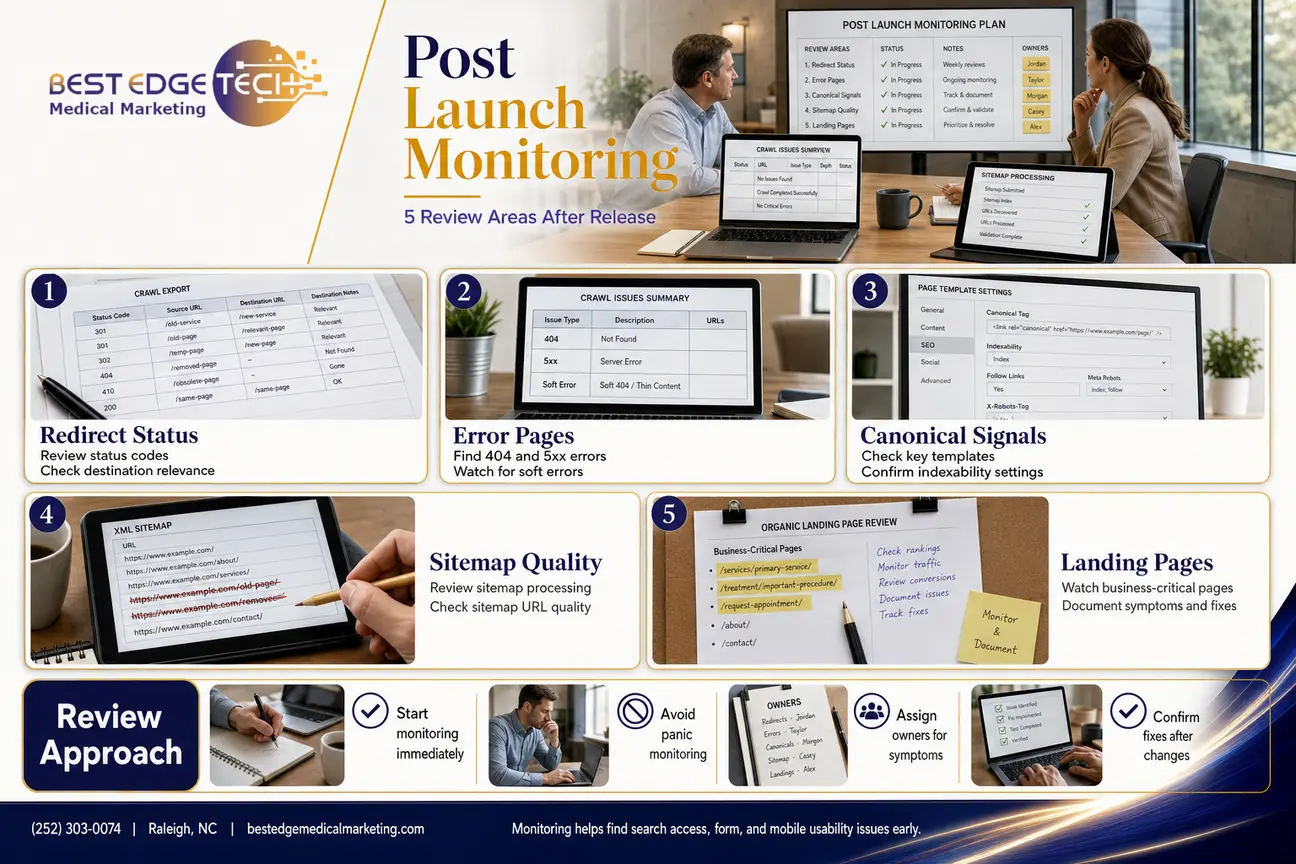
Launch monitoring should start immediately, but it should not become panic monitoring. The goal is to find technical, search, and conversion symptoms quickly, document them, assign owners, and confirm fixes. A redesign can look visually successful while quietly losing search access, form data, or mobile usability.
Monitor these items in the first post-launch review cycle and continue at planned intervals:
Document each issue with the page URL, symptom, likely owner, priority, and confirmation method. For example, a broken contact form is not just a development bug; it is an operational issue that affects inquiry handling. A blocked service page is not just an SEO issue; it affects how users find the practice’s published services.
If your team wants help aligning design, technical SEO, and launch QA, you can contact Best Edge Medical Marketing or call (252) 303-0074. Share your website URL, specialties and locations, redesign goals, recent site changes, and whether you are considering medical website design, healthcare SEO, or both.
A clean redesign process separates ownership. Practice leaders should not be expected to configure server redirects, and developers should not be expected to approve clinical, privacy, or advertising language. Clear ownership reduces missed decisions.
| Decision owner | Decisions to review |
|---|---|
| Technical team, developer, hosting team, or technical SEO support | DNS, hosting, server-side redirects, rewrite rules, canonicals, XML sitemaps, robots.txt, noindex controls, staging access, analytics tags, form integrations, consent technology, structured data, caching, performance, accessibility testing support, Search Console verification, backups, and rollback procedures. |
| Practice owner, administrator, or marketing lead | Active services, location accuracy, specialty naming, provider biography accuracy, page consolidation decisions, contact paths, inquiry routing, business-critical pages, operational wording, and whether new navigation reflects how the practice wants users to find information. |
| Compliance counsel or the practice’s privacy/compliance team | Patient-information handling, forms, chat tools, analytics and advertising pixels, third-party scripts, consent notices, retargeting, reviews and testimonials, before-and-after content, provider and treatment claims, state-specific advertising rules, privacy notices, and vendor agreements. |
Use HIPAA-aware safeguards when planning forms, analytics, chat, call tracking, and advertising technology, but do not treat a website redesign as automatically “HIPAA-compliant.” HHS publishes HIPAA Privacy Rule information through its Office for Civil Rights privacy guidance, and each practice should confirm requirements with its own counsel or compliance team.
This article is marketing education, not legal, medical or compliance advice. Confirm advertising and privacy requirements with your own counsel or compliance team.
A redesign checklist is not a substitute for an SEO recovery assessment when the site already has a serious visibility problem. If organic traffic or inquiries declined before the redesign began, the project team should not assume new templates will fix the issue. The practice may need a separate diagnostic process before, during, or after the redesign.
Consider a separate assessment when the site has persistent organic decline, widespread indexing exclusions, a history of deleted pages without redirects, major redirect chains, suspected spam-policy concerns, thin or duplicated service content, irrelevant page consolidation, unresolved local SEO issues, or tracking gaps that make performance unclear. Recovery work may include technical cleanup, content restructuring, internal-link repair, local visibility review, or measurement reconstruction.
A website redesign SEO project protects continuity during change. An SEO recovery project investigates why visibility has already been lost. The two can overlap, but they should not be blurred. If the practice is doing both, define separate goals, owners, and success measures so the team can make decisions based on evidence rather than assumptions.
Before launch, bring the practice owner, administrator, marketing lead, developer, technical SEO support, and compliance team into one approval workflow. The final review should be short enough to use but complete enough to prevent avoidable problems.
A well-planned healthcare website redesign does not depend on luck at launch. It depends on preserving what already works, documenting what changes, assigning the right decisions to the right people, and monitoring the redesigned site with enough detail to respond intelligently.
A redesign can affect SEO if it changes URLs, removes important content, blocks indexing, weakens internal links, slows key pages, or breaks conversion tracking. It does not have to hurt visibility when the team documents the baseline, preserves service-page continuity, maps redirects, and tests the site before and after launch.
If every important URL stays exactly the same, the redirect workload may be limited. Still, the team should crawl the old and new site to confirm that slugs, category paths, trailing slashes, protocol versions, provider pages, blog URLs, and media URLs did not change unexpectedly.
A redesign changes the site’s design, templates, content presentation, navigation, or conversion paths. A medical website migration usually changes URLs, domain structure, CMS, hosting, or other technical signals. Many projects include both, which is why the scope should be labeled before launch planning begins.
Not automatically. Important service pages should be reviewed for accuracy, search intent, internal links, calls to action, and compliance considerations before major rewrites. If pages are rewritten, merged, or retired, document why and confirm the replacement plan before launch.
The practice should approve service accuracy, provider details, location information, and operational wording. The technical team should approve implementation details such as redirects, canonicals, sitemaps, tracking, performance, and indexability. Counsel or the practice’s privacy/compliance team should review advertising, privacy, patient-information, testimonial, and claim-related issues.
Start monitoring as soon as the redesigned site is live, but interpret data carefully because some reports may lag. Check indexing, sitemap processing, errors, structured-data issues, Core Web Vitals, and search performance alongside crawl data and analytics rather than relying on one report alone.
Accessibility should be treated as a redesign requirement, not only an SEO task. Keyboard navigation, readable structure, labeled forms, visible focus indicators, descriptive links, contrast, and usable mobile layouts can affect how real users interact with the site and should be included in release approval.
Best Edge Medical Marketing is a medical marketing agency that provides marketing, SEO, design, and development services to businesses in the medical industry.
Call Us Today
(252) 303-0074