
Menu
Close

For a medical practice, website conversion tracking should answer a practical question: which website actions became real, documented patient inquiries? A reliable audit compares analytics events with form logs, phone records, intake notes, scheduling systems, and Search Console data. A tracked click, form submission, or appointment request is an observed action; it is not automatically a qualified inquiry, confirmed patient, or revenue event. The audit should define every event, test each conversion path, remove obvious duplication and noise, document attribution limits, and use HIPAA-aware data minimization checked with the practice’s own counsel or compliance team.
Start by listing every action that can create a patient inquiry: contact forms, appointment requests, click-to-call buttons, booking widgets, and location or specialty landing pages. Then verify whether each action is recorded in the right system, at the right stage, with the right business meaning. The goal is not to make the report look larger; it is to separate raw activity from valid inquiries, qualified inquiries, confirmed appointments, and later business outcomes.
Healthcare websites often have more than one path to inquiry. A visitor may submit a form, tap a phone number, request an appointment, use an external scheduling tool, or return later through a branded search. If the practice relies on one dashboard, it may miss important activity or overstate what happened.
This matters because practice owners and administrators make staffing, budget, and website decisions from these reports. If a report labels every tracked event as a “lead,” the practice may believe marketing is producing more qualified demand than the intake team actually sees. If tracking is broken, the opposite can happen: real inquiry volume may be hidden.
Conversion audits are especially important after a redesign, tracking change, new form plugin, new call tracking setup, or new scheduling workflow. Best Edge Medical Marketing’s medical website design work treats measurement as part of the site workflow, not as a decorative dashboard added after launch. The same principle applies to ongoing medical SEO services, where search visibility is only useful when the resulting actions are measured carefully.
Google’s own documentation for creating helpful, reliable, people-first content emphasizes content that helps people accomplish their goals, not pages built only for search engines. In the same spirit, a conversion audit should focus on what actually helps the practice understand patient inquiry behavior, not on inflated reporting labels. See Google Search Central’s guidance on helpful content for the broader search-quality context.
The strongest audit begins before anyone opens GA4. Define the business ladder first. Otherwise, every platform will use its own language, and the practice will spend meetings debating numbers instead of improving intake and website performance.
A useful ladder looks like this:
| Stage | What it indicates | What it does not prove |
|---|---|---|
| Tracked event | A configured interaction occurred | That the action was valid or valuable |
| Form submission | The form system accepted a submission | That the person was genuine, new, qualified, or reachable |
| Phone connection | A call platform or phone system logged a call | That the caller was a new patient inquiry |
| Appointment request | A request workflow was completed | That an appointment was confirmed |
| Qualified inquiry | Staff classified the inquiry as relevant | That an appointment occurred |
| Confirmed appointment | The scheduling system confirmed an appointment | That the person attended or became a patient |
| Confirmed patient | The practice’s internal records support that status | That the website alone caused the visit |
| Revenue | A financial record exists | That a single reported source deserves sole credit |
This distinction protects the practice from vague reporting. “The website recorded 40 form submissions” is different from “staff qualified 18 new inquiries.” “The call platform logged 60 calls” is different from “the website produced 60 new patients.” The audit should keep those statements separate unless the practice has a documented internal methodology for connecting them.
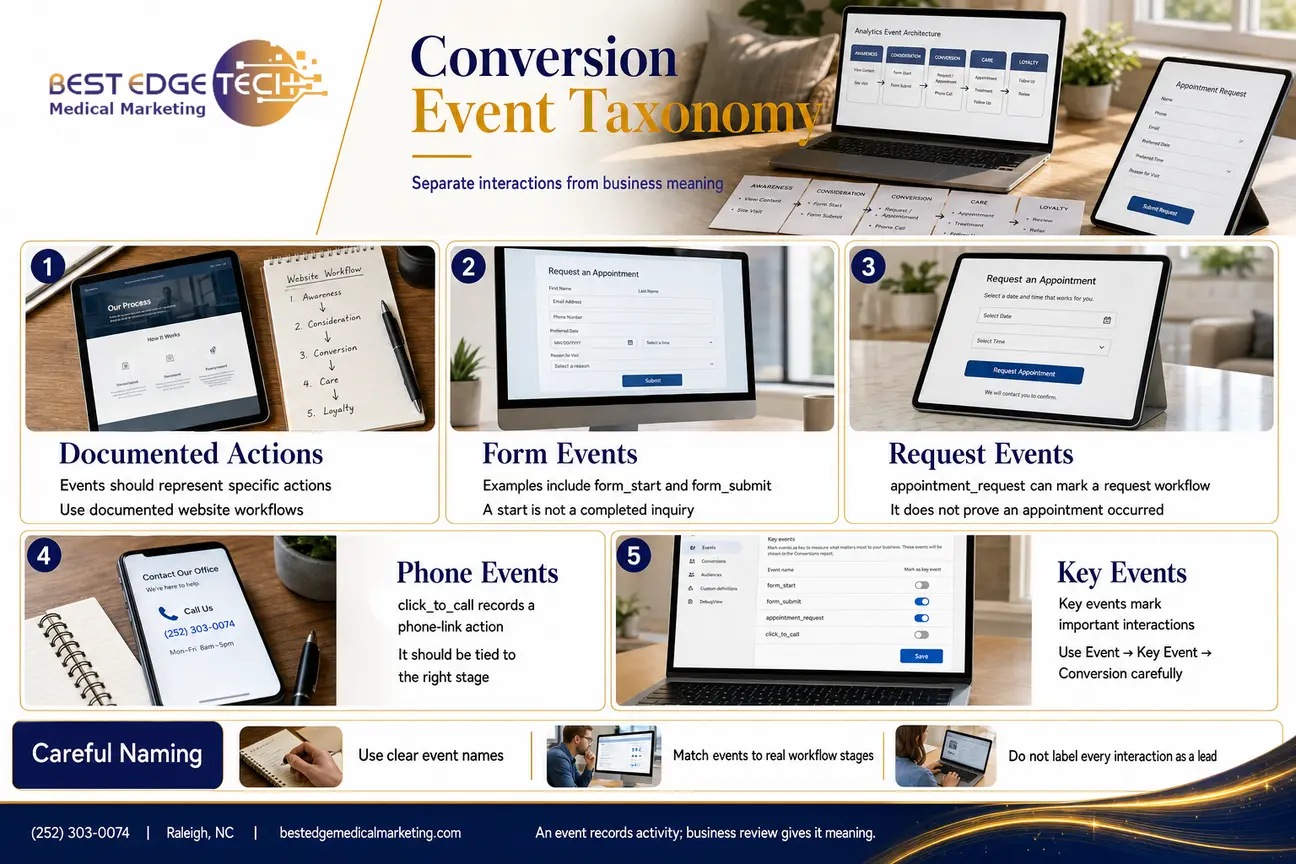
GA4 events are useful only when they represent specific, documented actions. For a medical website, a basic event architecture may include form_start, form_submit, appointment_request, click_to_call, and thank_you_view if a confirmation page is used. If the practice publishes an email address, a click_email event may also be relevant, but not every practice publishes email as an inquiry path.
Use the Google Analytics terminology sequence carefully: Event → Key Event → Conversion. In plain language, an event records an interaction; a key event marks an interaction that the business has identified as especially important; conversion language may then appear in advertising or conversion-reporting contexts. Do not let the label create a bigger business claim than the data supports.
The audit should ask five questions for every event:
For forms, form conversion tracking should separate a visitor beginning a form from a successful submission. A submit-button click is only an interaction. It may happen before validation fails, before a spam filter rejects the submission, or before the system accepts the record. The more reliable trigger is usually a confirmed success state from the form system, such as a successful response or controlled confirmation page.
For appointment requests, define the workflow before naming the event. A scheduling widget opened, a request submitted, a booking completed, an appointment confirmed, and an appointment attended are separate stages. Do not treat a completed request as a confirmed appointment unless the scheduling system supports that conclusion.
Form conversion tracking often looks simple until the practice compares GA4, inbox notifications, CRM records, and the form platform. The numbers may differ for legitimate reasons. Some visitors start forms and abandon them. Some submissions fail validation. Some are spam. Some duplicate a previous inquiry. Some reach the inbox but never become a qualified inquiry.
A clean audit reviews each form on the site, including contact, appointment request, specialty landing page, newsletter, referral, and event registration forms if they exist. For each one, document the form name, page URL, destination inbox or system, confirmation behavior, and event name. If the form passes data into a CRM or intake system, note whether the handoff is instant, delayed, or manual.
Use a controlled test window. Submit a clearly labeled test record that does not resemble a real patient story and does not include protected or sensitive health details. Confirm whether the same test appears in GA4 events, the form platform, the notification inbox, the CRM or intake tool, and any scheduling or practice-management workflow that should receive it. Then remove or classify the test according to the practice’s internal process.
When form conversion tracking shows more submissions than the form platform, look for duplicate triggers. A form may fire once on submit and again on the thank-you page. A user may refresh the confirmation page. A tag may exist both in a tag manager and hard-coded into the site. A single-page app may change state in a way that repeats the event.
When GA4 shows fewer submissions than the form platform, look for blocked scripts, consent states, missing tags, plugin changes, caching, validation flows that bypass the trigger, or external form tools that do not return the user to the expected page. The fix is not always “add more tracking.” Sometimes the right fix is simplifying the success condition.
Phone call tracking deserves a separate audit because phone behavior is not the same as form behavior. A click-to-call event records that a visitor activated a phone link. It does not prove the call connected, that staff answered, that the caller was new, that the inquiry was qualified, or that the person became a patient.
A medical practice should compare website click events with call-platform or phone-system records. The reconciliation should account for multiple clicks from one visitor, staff tests, existing patient calls, missed calls, call transfers, direct calls from Google Business Profile, and calls from printed or offline materials. If the practice uses tracking numbers, confirm that routing is consistent and that the correct number appears in the correct context.
Desktop behavior also matters. On a desktop computer, a phone link may open a calling application, do nothing useful, or be copied into another device. On mobile, the click may be closer to a call attempt, but it still is not proof of a connected call. Phone call tracking reports should therefore use careful language: “phone link clicks,” “logged calls,” “answered calls,” and “qualified phone inquiries” are not interchangeable.
For practices with multiple locations or specialties, document how calls are routed. A specialty landing page may use the same central number as the homepage. A location page may use a local number. A booking service may use a separate callback workflow. The audit should identify which calls can be tied to the website and which belong to another channel.
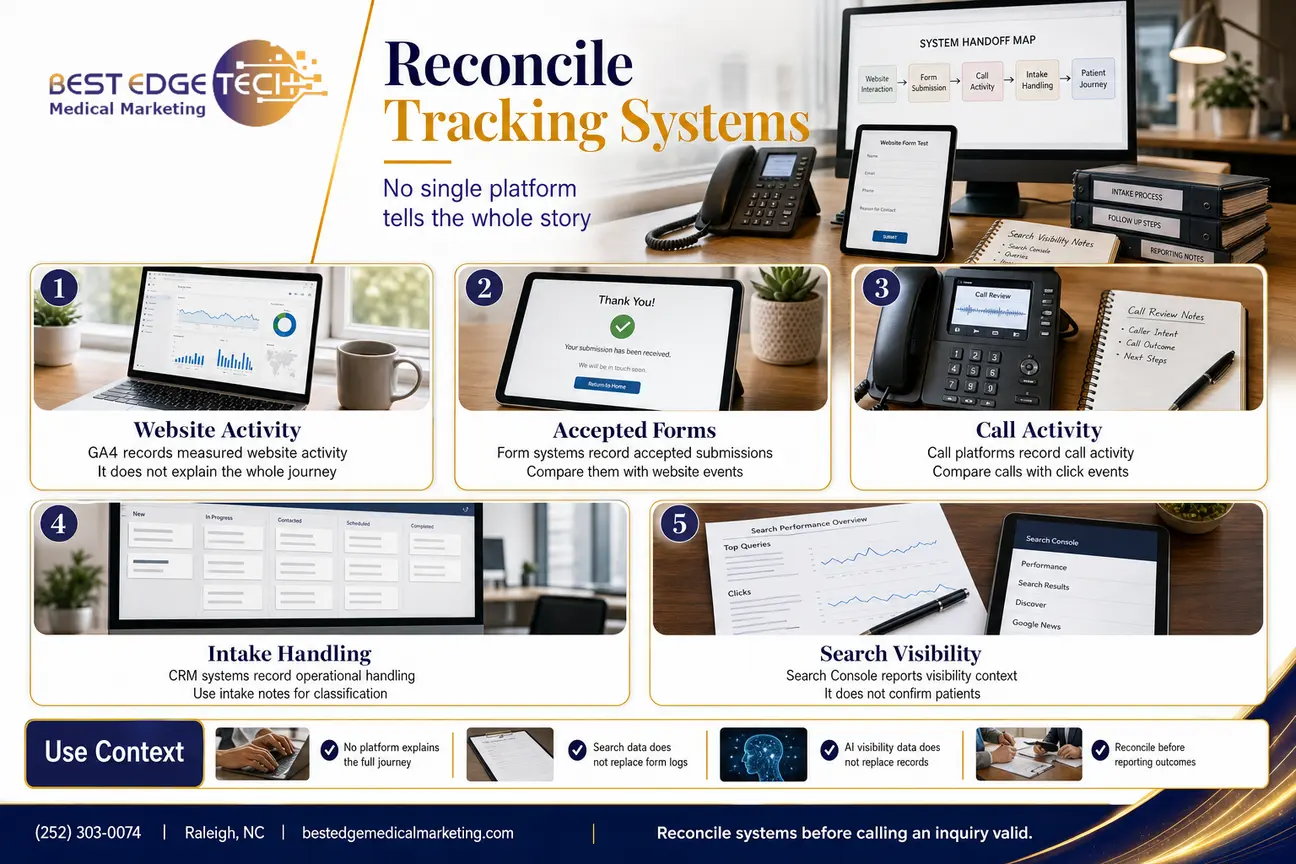
No single platform explains the whole patient inquiry journey. GA4 records measured website activity. Form systems record accepted submissions. Call platforms record call activity. CRM or intake systems record operational handling. Search Console reports search visibility and search-result performance, not confirmed patients.
For organic visibility, Search Console can provide context that analytics alone cannot. As of 2026, Google’s Generative AI performance report describes performance in Google generative AI features, including AI Overviews and AI Mode. That data can help a practice understand search visibility, but it does not replace GA4 events, call records, form logs, or confirmed patient data.
| System | What to compare | Common limitation |
|---|---|---|
| GA4 | Events, key events, landing pages, source and medium | May miss blocked, consent-limited, or incorrectly tagged actions |
| Form platform | Accepted submissions, spam flags, validation failures | May not show marketing source clearly |
| Call platform or phone system | Logged calls, answered calls, missed calls, call duration, routing | May include existing patients, staff, vendors, and non-website calls |
| CRM or intake workflow | Valid inquiries, duplicate records, follow-up status | Depends on staff process and consistent classification |
| Search Console | Queries, pages, impressions, clicks, search features | Does not confirm inquiries, appointments, patients, or revenue |
This reconciliation is where lead attribution becomes more disciplined. Instead of asking, “Which channel gets all the credit?” ask, “Which source was recorded before the inquiry, and what assumptions are built into that report?” That phrasing is more honest for healthcare decisions, where a person may search several times, compare providers, read reviews, call later, and return through a branded query.
If your practice is evaluating website performance as part of a broader redesign, pair this audit with the principles in medical website design that converts. Conversion design and conversion measurement should support each other: clear forms, useful calls to action, accessible contact paths, and accurate reporting.
Lead attribution is a reporting convention, not proof that one channel caused a patient decision. A source and medium can describe the recorded visit that preceded an inquiry. They usually cannot describe every influence: referrals, brand familiarity, prior searches, reviews, offline recommendations, or a previous website visit.
Begin by documenting which platform supplies the source. GA4 may report the session source. A call platform may assign a channel from a tracking number. A CRM may store the first form value it received. A scheduling tool may overwrite or omit the original campaign parameters. These systems can all be useful, but they may not agree.
Next, test UTM parameters. Create a tagged URL for a non-public test, move through the form or booking path, and confirm whether the source, medium, and campaign survive redirects. If users leave the main domain for an external scheduler, check whether the session returns with a self-referral. If self-referrals appear, list every external domain in the conversion path and document how source handling is configured.
Direct traffic also needs caution. “Direct” may include typed URLs, bookmarks, missing referrers, stripped tracking parameters, privacy restrictions, or broken redirects. Treat direct traffic as a category requiring interpretation, not as proof that no marketing influence existed.
A trustworthy lead attribution report should state its method. For example: “Source is based on the GA4 session associated with the form submission where available.” Or: “Phone source is based on the tracking number assigned to the landing page.” This gives decision-makers a clear view of what the report can and cannot support.
Inflated reporting usually comes from a small set of repeatable problems. The audit should look for them systematically instead of arguing over dashboard totals.
Common duplicate causes include a form firing on submit and on the thank-you page, a thank-you page refresh, multiple listeners watching the same action, a booking tool and main site both reporting the same completion, or a tag deployed in more than one place. Use browser-debugger recordings, tag-manager version history, event counts by page, and form-platform totals to identify the trigger.
Spam and invalid submissions require a separate filter. Repeated identical messages, malformed contact details, suspicious timing, unusual source patterns, and submissions outside the practice’s normal service context may indicate low-quality records. Keep raw diagnostic records where appropriate, but do not report suspected spam as qualified inquiries.
Internal traffic can distort GA4 events and call reports. Staff may test forms, agency teams may perform quality assurance, administrators may demonstrate the site, and front-desk teams may click call buttons during training. Maintain a test log and, where the analytics platform supports it, mark known internal traffic. The goal is to avoid mistaking operational testing for patient demand.
Self-referrals are common when booking, payment, or scheduling tools live on another domain. Review referral-source reports, list the external domains, test with tagged URLs, and compare timestamps with booking-system records. If the original source disappears during the journey, the report should disclose that limitation.
A redesign is one of the most common times for tracking to break. New templates, forms, URLs, scripts, consent tools, and scheduling embeds can change how events fire. A launch should not be judged only by whether tags technically fire; it should confirm that recorded actions still match real workflow stages.
Before launch, inventory every conversion action. Record event names, triggers, page URLs, form destinations, phone links, booking tools, external domains, thank-you pages, and source-attribution settings. Export or document current baseline counts by system. Confirm that staging does not send production data.
During staging, test desktop and mobile paths. Submit successful and failed forms. Test click-to-call links. Open appointment widgets. Follow redirects. Check whether confirmation pages load. Verify that event names remain consistent unless the practice intentionally changed the naming structure.
After launch, repeat the test matrix and compare first-day and first-week records with form, call, CRM, and scheduling systems. Investigate abrupt zeroes, unexplained spikes, duplicate totals, broken thank-you pages, and changes in the ratio between accepted submissions and GA4 events.
If a practice is planning a redesign, conversion measurement should be scoped early. Best Edge Medical Marketing’s healthcare marketing services include confirmed service areas such as healthcare website design, medical SEO, AI search optimization, and related healthcare marketing work. Scope depends on factors such as practice size, specialties, number of locations, competitive environment, content needs, technical debt, and existing measurement setup.
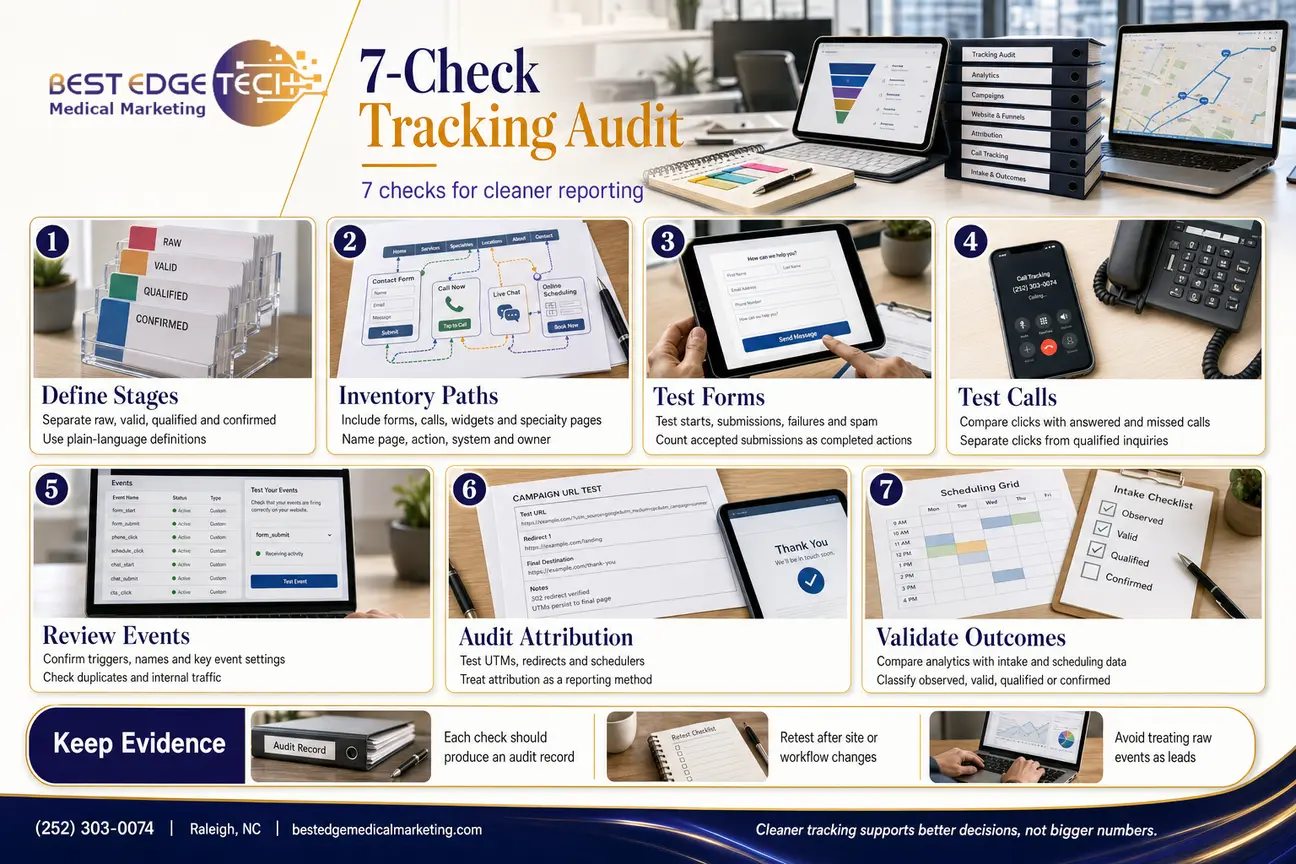
Use this seven-part workflow when auditing a medical website’s conversion data. It is intentionally practical: each check produces evidence the practice can keep in a recurring audit record.
Separate raw events, valid submissions, phone connections, appointment requests, qualified inquiries, confirmed appointments, confirmed patients, and revenue. Each stage should have a plain-language definition that the practice, intake team, website vendor, and marketing partner can all use consistently.
Include forms, phone links, appointment widgets, external scheduling tools, specialty pages, location pages, and thank-you pages. The inventory should name the page, the action, the expected destination system, and the person responsible for retesting it after a site or workflow change.
Test starts, successful submissions, failed submissions, spam handling, CRM handoff, and confirmation behavior. Form conversion tracking should prove that the form system accepted the submission before the record is counted as a completed inquiry action.
Compare click-to-call events with call records, answered calls, missed calls, staff tests, routing, and existing-patient calls. Phone call tracking should distinguish between a phone-link click, a logged call, an answered call, and a qualified phone inquiry.
Confirm triggers, event names, key event settings, parameters, duplicate tags, internal traffic handling, and reporting definitions. GA4 events should follow the Event → Key Event → Conversion vocabulary without implying that a recorded interaction automatically became a qualified patient inquiry.
Test UTM preservation, redirects, external schedulers, self-referrals, direct traffic, and source assumptions. Lead attribution should be presented as a documented reporting method, not as proof that one channel caused the entire patient decision.
Compare analytics with form logs, call systems, intake notes, scheduling data, and practice records without overstating what any one system proves. Keep the final report clear about which numbers are observed, valid, qualified, confirmed, or financial.
Conversion tracking for a healthcare organization can involve privacy, vendor, and data-flow considerations. The right approach is HIPAA-aware and cautious. Do not send unnecessary health information, appointment details, diagnosis information, patient names, phone numbers, email addresses, or free-text form content into analytics parameters unless the practice’s approved workflow specifically permits it.
The HHS Office for Civil Rights provides the federal HIPAA privacy framework, and practices should assess their data flows with appropriate advisors. For background, see the HHS HIPAA Privacy Rule information. This article does not determine whether a specific tool, configuration, vendor relationship, or tracking setup satisfies a legal requirement.
Use data minimization as a working habit. Track that a form was submitted, not the full message. Track that a call link was clicked, not personal details. Track that an appointment request workflow completed, not unnecessary health context. Review analytics, call tracking, form, CRM, scheduling, and advertising-vendor data flows with the practice’s compliance team.
Access control also matters. Limit who can view raw submissions, call recordings, intake notes, and downstream patient-status fields. If marketing reports include qualified inquiries, confirmed appointments, or revenue, document who classified those records and which system supplied the status. Avoid exporting more detail than the report needs.
Good reporting uses precise verbs. “The website recorded” means a tracked action occurred. “The form system received” means the form platform accepted a submission. “The call platform logged” means a call event exists. “Staff classified” means the intake team applied a business definition. “The scheduling system confirmed” means the appointment workflow produced a confirmation. “The practice records attributed” means internal records support a later classification.
This language may feel less dramatic, but it is more useful. It helps administrators identify where the funnel is strong and where it leaks. A high number of form starts with few submissions may point to form friction. Many phone clicks with few connected calls may suggest routing or staffing issues. Many valid submissions with few qualified inquiries may reveal mismatch between page messaging and service fit.
A recurring audit record should include the event name, business meaning, trigger, source system, downstream system, known exclusions, owner, last test date, last discrepancy checked, and classification type: observed, valid, qualified, confirmed, or financial. Keep this record updated when the website, CRM, phone system, booking tool, or marketing campaign changes.
For practice owners and marketing directors, the decision standard is simple: if a number appears in a monthly report, the team should be able to explain where it came from, what it means, what it excludes, and what it does not prove.
A practice can run a basic audit internally, but outside support may help when the site has multiple specialties, several locations, external booking tools, inconsistent CRM data, or a redesign in progress. The key is choosing a partner that is comfortable saying what cannot be proven, not just what looks good in a dashboard.
Best Edge Medical Marketing is a Raleigh-headquartered healthcare marketing agency serving medical practices across the United States. If your team wants help evaluating conversion paths, measurement gaps, website structure, or reporting language, you can contact Best Edge Medical Marketing or call (252) 303-0074. Share your website URL, specialties and locations, goals, recent site changes, current tracking tools, and the service you are considering.
Results from tracking improvements depend on the existing website, competition, technical setup, staff process, and execution. No reporting system can guarantee rankings, patient volume, revenue, or AI citations. What a strong audit can do is give the practice a more defensible view of observed inquiries and the workflow behind them.
The purpose of website conversion tracking is not to create bigger numbers. It is to help medical practices understand which website actions are happening, which ones become real inquiries, and where the handoff breaks down. When form conversion tracking, phone call tracking, GA4 events, and lead attribution are reconciled with operational systems, decision-makers can discuss performance with more precision.
Build the audit around stages, evidence, and careful language. Keep raw events separate from valid submissions. Keep qualified inquiries separate from confirmed appointments. Keep patient and revenue reporting inside the practice’s approved operational process. Above all, treat healthcare tracking as a HIPAA-aware workflow that deserves documentation and review.
This article is marketing education, not legal, medical or compliance advice. Confirm advertising and privacy requirements with your own counsel or compliance team.
A GA4 event or key event records a configured interaction. A qualified inquiry requires a separate assessment or operational classification confirming that the submission or call meets the practice’s definition of a relevant prospective inquiry.
Usually, a button click should be treated as an interaction rather than proof of successful submission. The audit should compare the event with the form system’s accepted-submission record and use a confirmed success state where technically available.
No. It indicates that a tracked phone link was activated. Call records are needed to determine whether a call connected, whether it was answered, and whether it represented a relevant new inquiry.
Possible causes include duplicate events, spam filtering, validation failures, blocked consent states, missing tags, CRM integration delays, redirects, or forms that submit through an external system. Compare timestamps and identifiers without placing unnecessary personal information into analytics.
Keep raw diagnostic records where appropriate, but separate suspected spam from valid submissions and qualified inquiries. Document the filtering rule and avoid reporting raw event totals as patient-lead totals.
Test every form, phone link, booking path, confirmation state, source parameter, redirect, and external scheduling domain on relevant devices and browsers. Compare the resulting records with the form, call, CRM, and scheduling systems.
No. Search Console reports search visibility and performance metrics; it does not by itself confirm patient status or revenue. Use it as a visibility comparison point alongside analytics and operational records.
No automatic conclusion should be made. Tracking may involve privacy, vendor, and data-flow considerations. Use a HIPAA-aware workflow and confirm advertising and privacy requirements with the practice’s counsel or compliance team.
Best Edge Medical Marketing is a medical marketing agency that provides marketing, SEO, design, and development services to businesses in the medical industry.
Call Us Today
(252) 303-0074