
Menu
Close

Medical Core Web Vitals help practice owners, administrators, and healthcare marketing teams understand whether loading, responsiveness, and layout movement are creating avoidable friction on important website paths. They do not promise rankings, patient inquiries, or revenue. They are a practical diagnostic framework for checking whether service pages, contact forms, phone links, and mobile navigation feel stable and usable while real visitors are trying to evaluate the practice.
Quick Answer: Core Web Vitals measure loading performance, interaction responsiveness, and visual stability. The three current metrics are Largest Contentful Paint, Interaction to Next Paint, and Cumulative Layout Shift. Practice teams should review real-user data where available, test representative pages, identify the affected page element or resource, and re-test after controlled changes. Performance improvements are site-specific and should be handled without damaging accessibility, content, forms, tracking, or required practice functionality.
For a medical practice website, these metrics matter because visitors often arrive with a task: compare a service, confirm whether the practice fits their need, call the office, submit a request, or read provider information. If the main content loads slowly, a form hesitates, or a phone button jumps as the page settles, the site may be creating friction before the practice has a chance to build trust.
Google describes Core Web Vitals as real-world user-experience metrics covering loading, interactivity, and visual stability, and says it highly recommends site owners achieve good Core Web Vitals for Search success and general user experience, according to Google Search Central’s Core Web Vitals documentation. That recommendation should not be translated into a guarantee. Better page experience is useful, but ranking, visibility, and patient inquiry outcomes depend on many factors.
The practical goal is not to chase a perfect score. The goal is to find the pages where avoidable delay, interaction lag, or layout movement may interrupt a visitor’s path from search result to service information to contact action.
Core Web Vitals translate broad “page experience” concerns into measurable categories. They help a marketing lead and web team discuss technical performance without reducing the conversation to vague complaints such as “the site feels slow.”
The three categories are straightforward:
On a healthcare site, these issues usually show up on high-value pages rather than on the homepage alone. A specialty service page may carry a large hero image, a scheduling embed, a provider module, several calls to action, review or reputation elements, and tracking scripts. A contact page may include forms, maps, phone links, consent notices, or embedded scheduling tools. Each component can affect performance differently.
This is why medical website speed should be reviewed at the page-template level, not judged from a single homepage test. A service-page template may have a different problem than a blog template. A contact path may perform differently from an educational article. Mobile users may experience different friction than desktop users.
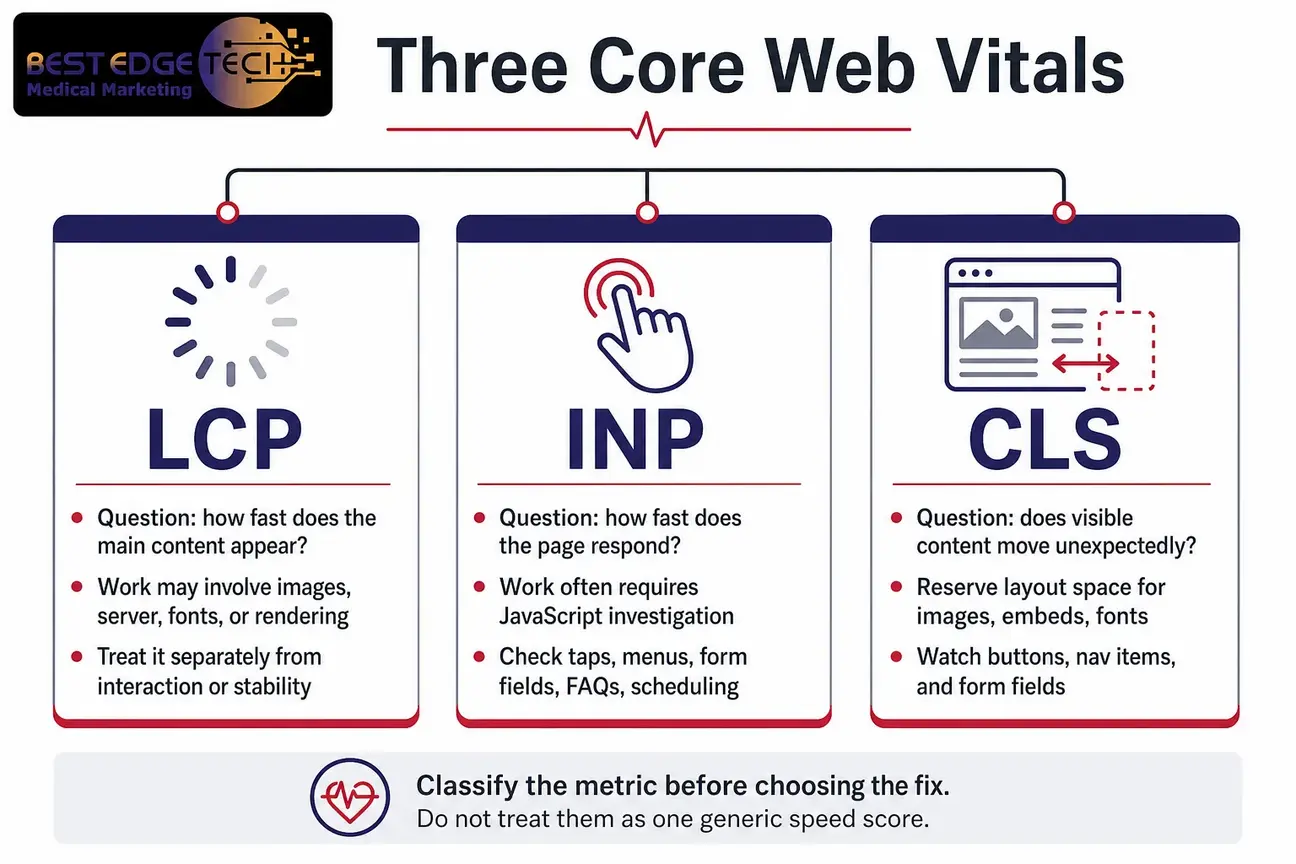
The three metrics are related, but each answers a different question. Treating them as one generic “speed score” can lead a team toward the wrong fix. A page with a loading problem may need image, server, font, or rendering work. A page with an interaction problem may need JavaScript investigation. A page with a stability problem may need layout reservations for images, embeds, fonts, or dynamic components.
Largest Contentful Paint measures loading performance. In practical terms, it asks how long it takes for the largest meaningful visible element to appear in the viewport. On a medical service page, the Largest Contentful Paint element might be a hero image, a large heading block, a service-introduction section, or another primary above-the-fold element.
Google says site owners should “strive to have LCP occur within the first 2.5 seconds of the page starting to load.” That is recommendation-strength guidance, not a promise that one metric will produce a ranking improvement or a specific number of inquiries.
Common areas to investigate include oversized hero images, unoptimized image formats, render-blocking styles, slow font loading, page-builder output, and server or caching configuration. The right fix depends on the measured cause. Replacing an image, changing loading behavior, or adjusting templates should be tested against the page’s actual Largest Contentful Paint element.
Interaction to Next Paint measures responsiveness after user interactions. It is especially relevant on practice websites because visitors often need to open mobile navigation, tap a phone button, choose a form field, submit an inquiry, expand an FAQ, or interact with a scheduling component.
Google says site owners should “strive to have an INP of less than 200 milliseconds.” Again, this is not a guarantee of search placement or patient volume. It is a useful signal that the page may be slow to respond after visitor actions.
Interaction to Next Paint issues often require deeper diagnosis than image compression. A marketing script, tracking tag, chat widget, form embed, page-builder component, or third-party scheduling tool may contribute to long tasks that delay the browser’s response. Removing scripts without analysis can break analytics, consent workflows, forms, or scheduling. The team should identify the responsible resource and test a controlled change.
Cumulative Layout Shift measures visual stability. It asks whether visible elements move unexpectedly while the page is loading. On a medical website, Cumulative Layout Shift can become especially frustrating when a visitor tries to tap a phone link, navigation item, service button, or form field and the target shifts before the tap lands.
Google says site owners should “strive to have a CLS score of less than 0.1.” This target should be used as guidance for diagnosis, not as a standalone business promise.
Possible causes include images without reserved dimensions, late-loading fonts, embeds that load after the main layout, consent banners, announcement bars, dynamic review widgets, or form elements that expand after scripts execute. A Cumulative Layout Shift issue should be traced to the moving element so the web team can reserve space, adjust loading behavior, or change the component without harming the page’s purpose.
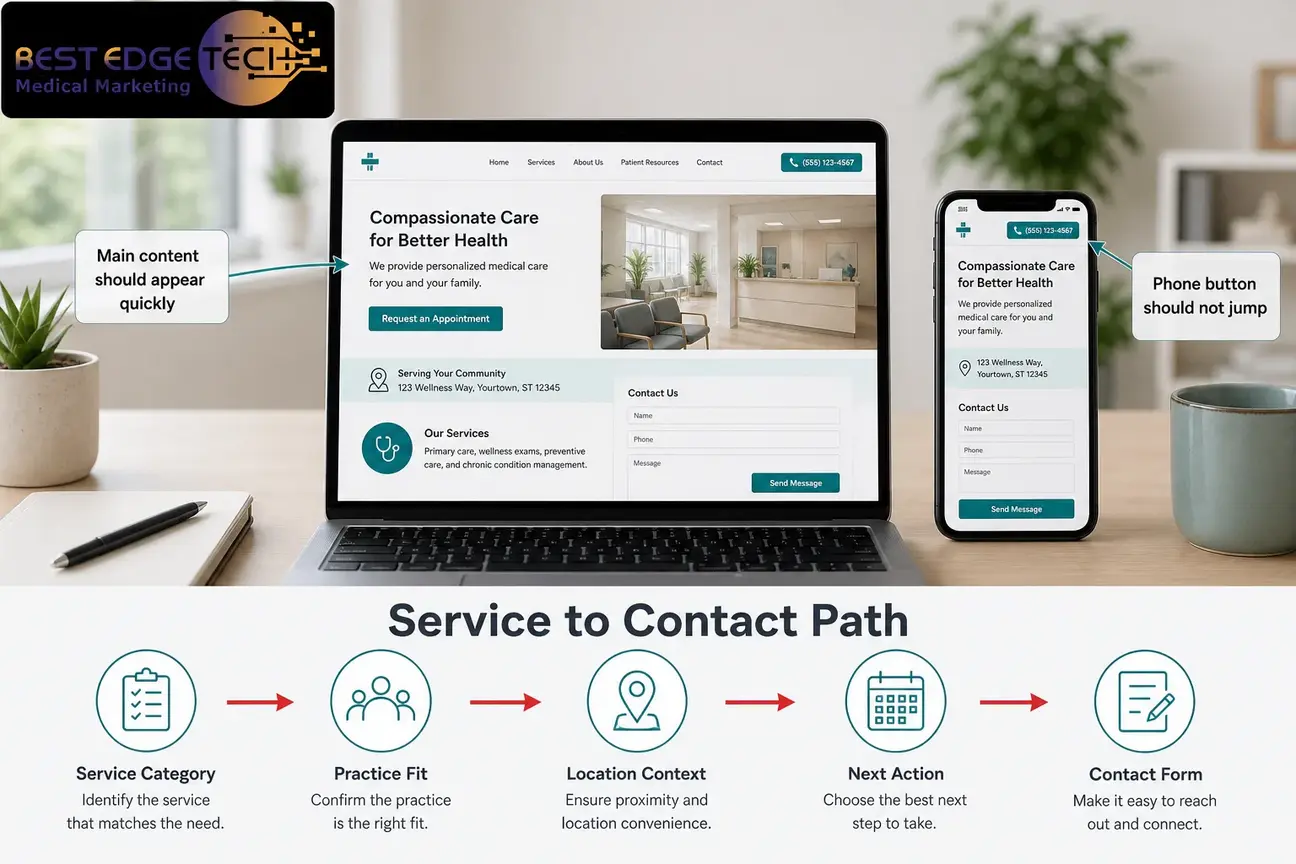
medical website speed is not just a technical score. It affects how quickly decision-making information becomes available and how smoothly a visitor can move through the page. For healthcare practices, this often means service pages, provider or practice information, location details where relevant, and contact paths.
A primary service page should make the service category, practice fit, location context, and next action easy to find. If the main content is delayed because a large image or heavy component loads first, the visitor may see a blank or incomplete page longer than necessary. That is a possible Largest Contentful Paint concern.
A contact form should remain usable while scripts, styling, and embedded tools load. If a visitor taps into a field and the page hesitates, that may point to Interaction to Next Paint friction. If an embedded tool or banner shifts the form downward, that may point to Cumulative Layout Shift friction.
These problems do not mean the content is medically inaccurate, the design is poor, or the practice needs a full rebuild. They mean the web team should diagnose the specific page, template, and component. Sometimes a narrow technical change is enough. Sometimes the issue is tied to a broader design or development pattern. A redesign is not automatically required.
For practices planning site improvements, medical website design should consider performance, form usability, mobile navigation, and content hierarchy from the beginning. Retrofitting performance after launch can still help, but it is usually more efficient when templates and components are planned with page experience in mind.
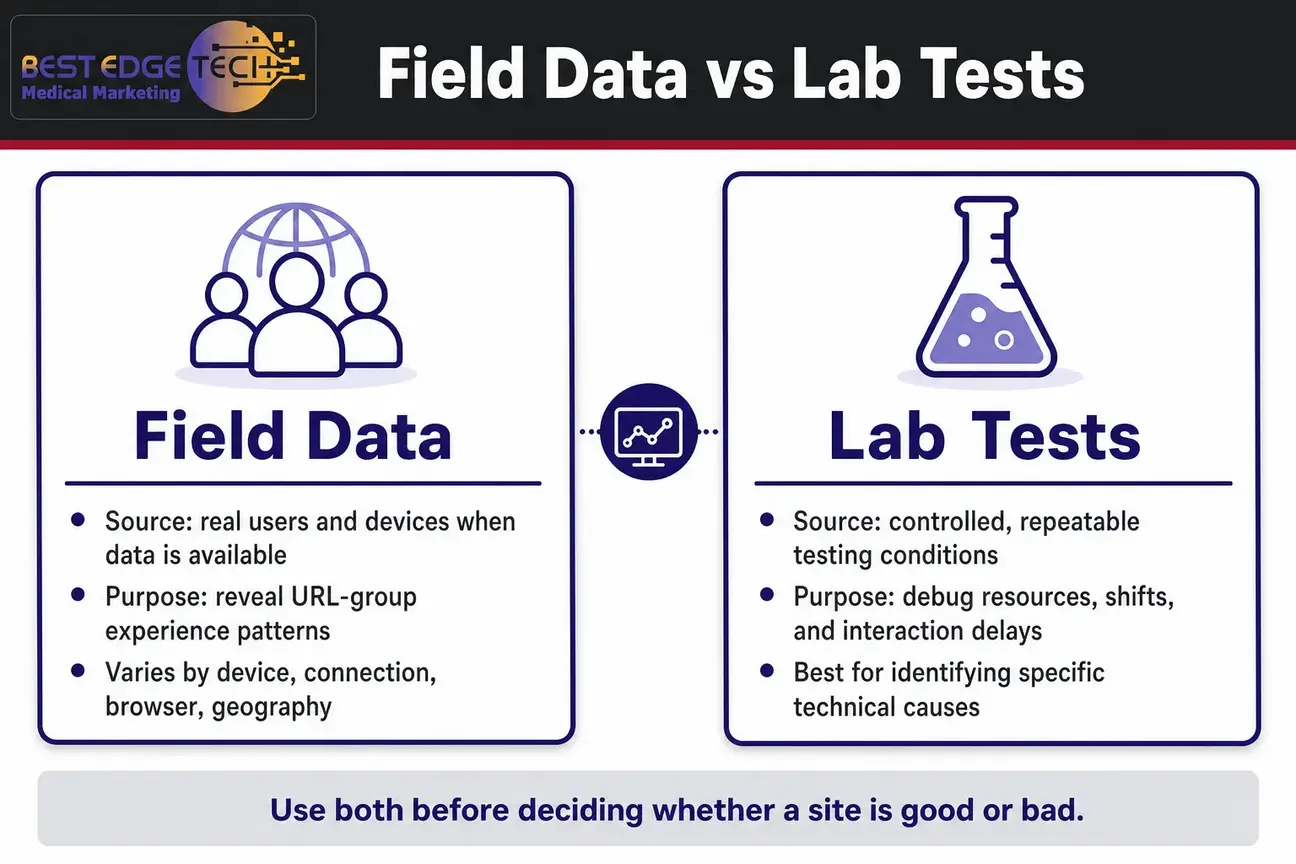
Practice owners often see one test score and ask whether the website is “good” or “bad.” That is understandable, but it is not enough for diagnosis. Core Web Vitals can be evaluated through field data and lab data, and each has a different purpose.
Field data reflects observations from real users and devices where enough data is available. It can reveal how visitors experience groups of URLs across real conditions. It may vary by device, connection, browser, geography, traffic source, and page template.
Lab data comes from controlled testing. It is useful for debugging because it can identify specific resources, layout shifts, and interaction delays under repeatable conditions. Lab tests may not perfectly match every visitor’s experience, but they help the technical team isolate causes.
Google’s documentation directs site owners to check the Core Web Vitals report in Search Console and use available testing tools to understand how these metrics are performing. A responsible audit uses both kinds of evidence where possible, then ties findings back to actual pages and user paths.
One mobile lab test of the homepage cannot represent the whole site. A dental practice, med spa, plastic surgery practice, or anti-aging clinic may have service pages with very different layouts, scripts, media, and forms. The contact path may be a different template altogether. Testing should reflect how visitors actually move through the site.
The best workflow is structured enough to prevent guesswork but flexible enough for the site’s actual architecture. Use the following sequence as a practical starting point for a medical practice website.
Begin with the pages that influence patient inquiries and practice evaluation. Include primary service pages, contact pages, form paths, location pages where applicable, provider or practice information pages, high-traffic educational pages, and campaign landing pages.
Do not start and stop with the homepage. The homepage may not be the page where organic visitors enter, and it may not be the page where contact friction occurs. A strong audit maps the pages that support comprehension, trust, and action.
Use Search Console to review URL groups and identify whether issues appear across templates or only on certain pages. If several service pages are grouped together with a loading concern, the template may be involved. If only one landing page is affected, the issue may be page-specific.
Record whether mobile, desktop, or both are affected. Mobile findings are often especially important for practice websites because many visitors search while away from a desktop environment. Still, desktop should not be ignored if administrative, referral, or research-oriented audiences use it.
Select a small set of representative pages: a primary service page, a contact page, a form path, an educational article, and a page with any heavy embed or third-party feature. If the practice has multiple locations or specialties, include examples from those templates.
Run tests more than once and preserve the test date, URL, device setting, and page version. A single run can be affected by temporary conditions. Consistent patterns matter more than isolated noise.
Separate the finding into the right category. A Largest Contentful Paint problem points toward loading the main visible element. An Interaction to Next Paint problem points toward responsiveness after interaction. A Cumulative Layout Shift problem points toward unexpected movement.
This classification prevents generic work orders such as “make the site faster.” A developer, designer, and marketing lead need to know which metric is affected and where the visitor path is interrupted.
Do not begin with a broad plugin purge or an immediate redesign. First identify the element, script, image, font, embed, or layout event associated with the problem. For Largest Contentful Paint, ask what the LCP element is. For Interaction to Next Paint, review the interaction that was delayed. For Cumulative Layout Shift, identify what moved.
This step protects useful functionality. A script may support analytics. A plugin may support forms. An embed may support scheduling. A banner may support a required notice. The fix should preserve what the practice still needs.
Not every performance issue deserves the same priority. A small issue on a low-traffic archive page may matter less than a major problem on a service page or contact form. Rank findings by their effect on service comprehension, navigation, phone access, inquiry access, and form completion.
This is where technical SEO and conversion design meet. The web team may have ten possible fixes, but the practice needs a sequence that protects the most important visitor paths first.
Core Web Vitals do not measure every accessibility or usability concern. A form can load quickly and still be difficult to use if labels are missing, focus states are unclear, contrast is weak, error messages are confusing, or keyboard navigation fails.
The W3C Web Accessibility Initiative standards and guidelines provide a recognized framework for accessibility work, and ADA web guidance explains why web accessibility matters for public-facing websites. This article is not legal or compliance advice, but practice teams should treat accessibility review as a separate, necessary discipline alongside performance work.
Document the proposed change, the reason for it, the affected pages, and the expected metric impact. Then implement the change in a controlled way where the development workflow allows it.
Examples might include resizing or reformatting a hero image, reserving dimensions for an embed, adjusting font loading, delaying nonessential scripts, reducing duplicate plugin output, or changing how a form component loads. The correct change depends on evidence from the affected page.
After the change, re-test the same page under comparable conditions where possible. Compare the affected metric, but also confirm that navigation, forms, phone links, tracking, consent elements, headings, visual hierarchy, and content still work.
A performance improvement that breaks a request form or removes necessary analytics can create a different operational problem. For healthcare marketing teams, confirmation should include both the technical metric and the visitor path.
Field data can take time to reflect real visitor behavior. After release, monitor Search Console and other measurement tools, and keep a record of what changed. If the same issue returns, the cause may be a newly added script, content update, plugin change, media upload, or template revision.
Core Web Vitals work is not a one-time cleanup. It should become part of release review for new service pages, new forms, redesigned templates, and major content or plugin changes.
Many medical practice sites are built on WordPress because it supports content publishing, service pages, forms, landing pages, and flexible templates. WordPress can perform well, but it needs disciplined theme, plugin, media, and hosting decisions. A slow or unstable page is rarely explained by “WordPress” alone.
When reviewing medical website speed on WordPress, look at these areas:
A technically plausible fix may still be inappropriate. Removing a plugin might eliminate a script but also remove form validation, accessibility features, tracking, or scheduling. Disabling an embed might improve a lab score but make the page less useful. The right question is not “What can we remove?” It is “Which resource is causing the measured problem, and how can we fix it while preserving the page’s purpose?”
Core Web Vitals are one part of technical website quality, but they are not the entire medical SEO strategy. Search visibility also depends on crawlability, indexability, useful content, internal linking, local information, structured data where appropriate, clear practice details, and the overall quality of the page experience.
For healthcare topics, practices should also think carefully about E-E-A-T: experience, expertise, authoritativeness, and trust. That does not mean inventing credentials or making unsupported medical claims. It means the practice’s own pages should accurately present provider information, practice details, service scope, locations, policies, and sourced educational content where clinical claims are made.
Performance improvements can support a stronger technical foundation, but they do not replace content quality or trust signals. A fast page with thin, unclear, or outdated information is still a weak page. A helpful page that is difficult to load or use can also underperform its potential.
Best Edge Medical Marketing offers medical SEO services for healthcare practices that need technical, content, and search visibility work considered together. The practical takeaway for this article is simple: do not isolate Core Web Vitals from the rest of the search and website strategy.
For additional context on the broader search side, the firm’s guide to medical SEO services discusses how medical search visibility involves more than one technical metric.
Website design decisions shape performance long before a test is run. Template hierarchy, media choices, form placement, navigation behavior, font systems, animations, and third-party components all influence the visitor’s experience.
A service page may look polished in a design mockup but become heavy when implemented with oversized images, multiple scripts, animated sections, and embedded scheduling tools. A contact page may look simple but become difficult to use if a form loads late or a consent component moves the call button.
Good design planning asks performance questions early:
A practice that is redesigning a website should treat performance as part of the design brief, not as a final cleanup item. Best Edge Medical Marketing’s article on medical website design that converts offers a broader look at how design, content, and user paths work together for healthcare websites.
This does not mean every Core Web Vitals issue requires a redesign. A narrow fix may solve a page-specific problem. But if the same issue repeats across service pages, location pages, and contact paths, the underlying template or component system may need more structured attention.
Core Web Vitals can reveal loading, responsiveness, and stability friction. They do not certify accessibility, legal compliance, content quality, or conversion readiness. A website can have acceptable Core Web Vitals and still create barriers for users who rely on keyboard navigation, screen readers, clear labels, sufficient contrast, or predictable focus order.
Healthcare practices should keep accessibility review separate from performance scoring. Important checks include:
This is also where HIPAA-aware thinking matters. Performance and analytics tools should be reviewed with privacy obligations in mind, and the HHS HIPAA Privacy Rule page is a useful starting point for understanding federal privacy topics. Practices should confirm advertising, privacy, and compliance requirements with their own counsel or compliance team. Do not assume that a speed tool, form plugin, analytics script, or hosting configuration resolves privacy obligations by default.
A practice owner or administrator does not need to become a developer to manage this work responsibly. The key is to ask questions that force the team to connect metrics to pages, evidence, and visitor paths.
| Question | Why it matters | What a useful answer includes |
|---|---|---|
| Which URLs or templates are affected? | Prevents the team from treating one page as the whole site. | Specific service pages, contact pages, templates, or URL groups. |
| Is the evidence field data, lab data, or both? | Clarifies whether the issue reflects real-user data, controlled testing, or both. | Source of data, device type, test date, and any limits. |
| Which metric is the problem? | Separates loading, responsiveness, and visual stability. | Largest Contentful Paint, Interaction to Next Paint, or Cumulative Layout Shift. |
| Which element or resource is responsible? | Reduces guesswork and broad, risky changes. | The image, script, font, embed, plugin, or layout event being investigated. |
| Will the fix affect forms, tracking, accessibility, or integrations? | Protects operational functions and measurement. | A confirmation plan before and after release. |
| How will the team confirm the change? | Prevents unverified “we optimized it” claims. | Re-test method, comparison pages, and monitoring plan. |
These questions also help define project scope. The amount of work depends on practice size, number of locations, number of specialties, technical debt, content volume, current templates, third-party integrations, and how many conversion paths need review. No responsible team can quote a universal fix without diagnosing the site.
As of 2026, healthcare marketers are also watching AI answers, AI Overviews, and other AI-assisted discovery paths. Core Web Vitals should not be confused with AI search optimization. Page experience, crawlability, useful content, structured information, and clear practice details can all support a stronger digital foundation, but no one can guarantee AI citations or inclusion.
The practical connection is quality control. If a page is difficult to load, unstable, thin, or hard to interpret, it may be weaker for both human visitors and search systems. But Core Web Vitals alone do not make a practice visible in AI answers. AI search work requires its own content and technical strategy.
Practices exploring that topic can review AI search optimization for healthcare. For this article, keep the distinction clear: Core Web Vitals diagnose page experience friction; AI search optimization addresses how healthcare information may be discovered, interpreted, and cited by AI-enabled systems where platforms document those behaviors.
Not every performance issue requires the same response. A narrow technical fix may be appropriate when one element causes a measurable problem on a small group of pages. Examples include resizing a hero image, reserving space for an embed, adjusting font loading, or reducing unnecessary script output on pages that do not need it.
A broader template fix may be appropriate when the same Largest Contentful Paint, Interaction to Next Paint, or Cumulative Layout Shift pattern appears across many service pages. In that case, the issue may be built into the layout system, page builder, plugin stack, or component library.
A redesign may be worth discussing when performance problems overlap with unclear navigation, weak service hierarchy, poor mobile paths, inaccessible forms, outdated content structure, and difficult maintenance. Even then, the redesign should be justified by evidence, not by fear of a score.
It may also be reasonable to wait on a change if the affected page has low importance, the evidence is inconsistent, or the proposed fix creates more risk than benefit. Performance work should be prioritized by visitor path, business relevance, and implementation risk.
medical Core Web Vitals give practice teams a practical way to discuss loading, responsiveness, and visual stability without relying on guesswork. The most useful audits connect the metrics to real pages: service pages, contact paths, form experiences, mobile navigation, and other places where visitors make decisions.
The correct priority depends on the practice website, templates, traffic, devices, content, third-party tools, and conversion paths. No metric alone promises rankings, patient inquiries, or revenue. The safest approach is to diagnose the affected page, identify the responsible element, make controlled changes, re-test, and confirm that accessibility, tracking, forms, and content still work.
If your practice wants help evaluating performance alongside healthcare SEO and website design, you can contact Best Edge Medical Marketing or call (252) 303-0074. Share your website URL, specialties, locations, recent site changes, goals, and the service you are considering so the discussion can start with the right context.
This article is marketing education, not legal, medical or compliance advice. Confirm advertising and privacy requirements with your own counsel or compliance team.
They are Google’s Core Web Vitals metrics applied to medical practice websites. They evaluate loading performance through LCP, responsiveness through INP, and visual stability through CLS. They help identify avoidable website friction but do not guarantee rankings or patient inquiries.
Google says site owners should strive to have LCP occur within the first 2.5 seconds of the page starting to load. For a practice website, the LCP element might be a hero image, headline block, or primary service content. The target is guidance, not a business outcome promise.
Interaction to Next Paint measures how responsive a page is after a visitor interacts with it. On a practice website, that may include tapping mobile navigation, selecting a form field, submitting an inquiry, expanding content, or using an embedded scheduling component.
Cumulative Layout Shift can happen when content moves after loading begins. Possible causes include images without reserved dimensions, late-loading fonts, banners, embeds, consent components, forms, or dynamic widgets. The exact cause must be identified on the affected page.
No. Good Core Web Vitals can support a stronger technical foundation and user experience, but they do not guarantee rankings, visibility, patient inquiries, revenue, or any timeline. Medical SEO also depends on content quality, crawlability, local information, trust signals, and competition.
No. A plugin may support forms, analytics, accessibility, scheduling, security, or other required functions. The team should identify the responsible resource, decide whether it is necessary, test a controlled change, and confirm that the page still works correctly.
No. Core Web Vitals address loading, responsiveness, and visual stability. Accessibility requires separate review, including keyboard navigation, visible focus, form labels, contrast, error handling, heading structure, target size, and assistive-technology behavior.
Best Edge Medical Marketing is a medical marketing agency that provides marketing, SEO, design, and development services to businesses in the medical industry.
Call Us Today
(252) 303-0074